Southafrica

Archive for June, 2009

South Africans must link cellphone to ID or be cut off

Tuesday, June 30th, 2009

Breaking news from South Africa:

From Wednesday, anyone buying a pre-paid SIM card in South Africa must provide proof of address and identification, according to a new law.”

The compulsory registration of all SIM cards in use, in terms of the Regulation of Interception of Communications and Provision of Communication-Related Information Act (RICA) will come into effect from 1 July 2009.”

Existing Vodacom, MTN and CellC contract customers will have 18months to register “subscribers that fail to comply with RICA within the specified time period will be deactivated”.

The new law also only allows for in person registration and no telephonic registrations will be allowed. You will also need to have the following with you when registering.

*Cellphone number
*Full names and surname
*ID number or passport number.
*Physical address.

Note: Not sure how this will affect tourists purchasing pre-paid simcards during the 2010 world cup soccer but I think you would be able to use your passport and accommodation info when purchasing.

“Cell C customers can register at all Cell C franchise stores or at stores where they see a RICA sign. Alternatively, they contact Cell C’s contact centre on 140 (free of charge) from a Cell C cellphone or 084 140 from any other phone for more information on RICA.

MTN customers can register at all MTN’s services centres across the country and in the event customer need guidance and clarity the MTN customer care number is 173, free from an MTN cellphone or 083 173 from any other phone, for prepaid subscribers.

Vodacom customers can register their SIM cards at any Vodacom outlets or they can contact their Customer Care Centre on 111, free from a Vodacom cellphone, or 082 111 from any other phone to find the nearest RICA agent where they can register their SIM card.” Mybroadband.co.za
Welcome to the family: iPhone 3.0 and Nokia N97

Wednesday, June 24th, 2009

While iPhone and Nokia have been busy getting their iPhone 3.0 software and Nokia N97 ready for the shelves, we’ve been busy making sure fring supports them as they hit the market so you get the biggest bang for your buck from day one!

fring now supports Apple’s latest iPhone 3.0 software update

Following Apple’s last week release of the iPhone 3.0 software update, we’re happy to announce that fring now supports the brand new iPhone 3.0 firmware , including the new iPhone 3Gs. What does it require of you!? Absolutely nothing! The version is already on your phone, ready for you to enjoy, with Apple’s latest and bestest yet.

For these of you who don’t have fring’s latest iPhone version yet, get yours today!

The brand new Nokia N97 is avaialble in stores now

Originally announced last December, Nokia’s just announced the official retail release of its much- anticipated N97 device, available in their flagship stores; fring is proud to support this cool, new device with its most recent and most social version to date- the 3.40 version.

The Nokia N97 flagship phone boasts a large 640×360 sliding/angling touch screen display, slide-out QWERTY keyboard, Symbian S60 5th Edition, 5 megapixel camera, and 32GB of internal memory.

Those of you who are lucky enough to get your hands on this new device are welcome to download fring today!

We are looking forward to hearing your feedback on the fring experience on the slick, new N97.

The fringTEAM

Feature highlight – merging contacts on 3.40

Monday, June 22nd, 2009

It seems that you guys really like the new 3.40 version - that’s great!

Some of you have asked about the manual contact merging, so here’s a little explanation for you:

How does it work?

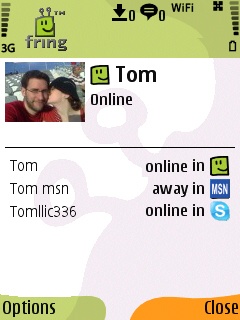
I have a friend called Tom. Now, Tom is such a good friend of mine that I’ve added him as a friend on MSN, Skype and fring.

On the new 3.40 version I can merge Tom’s entity from these services into one contact on my fring buddy list. Sounds convenient, isn’t it?

How do I do that?

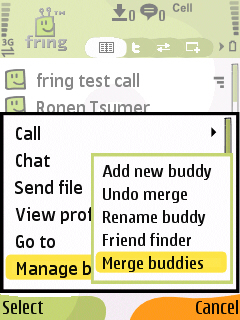
Highlight your buddy on the buddy list and choose Options –> Manage buddies –> Merge buddies.

menu friendfinder

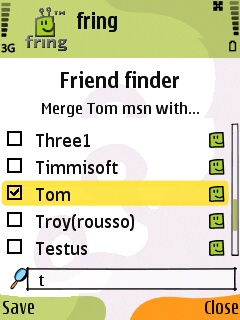
2. Check the box near the contact or the contacts you would like to merge with your buddy and click Save.
This process can also be done directly from my buddy’s profile screen by highlighting your buddy, choosing Options –> View Profile –> Options –> Merge buddy.

Cool. The first step is done.

profile


How do you call/chat this contact?
I see that Tom is now online and I wish to make a call to him. I choose him from the contact list and hit the green button. I’ll choose the service I wish to use and click the joystick.

To start a chat with Tom I can click on ‘options‘ –> ‘Chat‘ and start typing my message. Now, the first message will be broadcasted to all the services that Tom is currently available on. The conversation will continue on whatever service Tom will choose to reply on. Simple.

As always, we’d love to hear your thoughts and comments about this feature and about the brand new 3.40.

3.40.19 is out - new build for Symbian

Monday, June 22nd, 2009

Hello fringsters,

As you remember, we’ve released 3.40 a couple of weeks ago. We got lots of comments and feedbacks from you as well as some very helpful bug reports.

This is a quick post to let you all know that we’ve just released an updated version of fring 3.40 that should solve the bugs you guys reported about.

This version brings better stability as well as a smoother installation process.

Currently this version is available to Nokia S60 users. A version for Samsung Symbian handsets should be available in the next couple of weeks.

As always, please feel free to try it out and send us your thoughts - we’re always here to listen.

fringing popular fring video

Tuesday, June 16th, 2009

Hey guys

We’ve just been notified that a user’s video about fring, posted back in October 2008, is still very much active and still doing very well: with over 629,444 views, 1,276 ratings & 3389 text comment, it’s one of fring’s most successful videos to date!

So without further ado a huge shoutOUT from everyone here at fring HQ to youtube user huskermania. Thanks for the video dude, you rock!

Multi touch iPhone OS desktop monitor anyone?

Monday, June 15th, 2009

The guys over at Crunchgear are reporting on this amazing hack or hoax that surfaced on the weekend. Apparently “Some intrepid hackers have run what appears to be iPhone OS 2.x on a “multi-touch” monitor with accelerometer support.”

A Swedish design firm called Dreamfield has accepted responsibility for the video claiming the device is something out of their “labs”. People everywhere are calling this a hoax. All I can say is that even if this is a hoax, the idea is genius and I can’t wait to purchase a device like this in the very near future ;-)

Apple iPhone 3G S coming to South Africa July09

Thursday, June 11th, 2009

Some more great news for fringsters in South Africa. It is being reported that the much anticipated Apple iPhone 3G S, will soon go on sale in South Africa. According to the chief communications officer at Vodacom, Dot Field, “Vodacom will launch the iPhone 3G S, the fastest most powerful iPhone yet, in South Africa in July 2009″ Sadly though, no exact date or price was given.

Man I wish I could get this device a few days before the launch to play around with and report back.

Page 1 of 212»