Southafrica

Posts Tagged ‘Skype’

Skype Cowardly Blocks fring - Skype you suck

Monday, July 12th, 2010

For 4 years we have led mobile communication innovation, most recently with video calling on any advanced Smartphone and network.

Now that fring expanded capacity to support the huge demand for video calling for all users, Skype has blocked us from doing so.

They are afraid of open mobile communication. Cowards.

Needless to say, we are very disappointed that Skype, who once championed the cause of openness is now trying to muzzle competition, even at the expense of its own users.

We’re sorry for the inconvenience Skype has caused you.

As always, fring will continue to provide our users with the best mobile internet communication experiences that you deserve, with or without Skype.

The new fring version with free video calls, calls, live chat is available on any advanced smartphone, over any mobile operator, over your preferred internet connection (3G, 4G, WiFi) from the fring website here and app stores.

Let freedom fring!

Vodacom upgrades to 14.4 Mbps

Thursday, April 29th, 2010

fringsters listen up, I have great news for you!

Vodacom has just finished upgrading a huge section of their network (more than 3300 towers across South Africa) to support 14.4 Mbps Internet speeds. As for the rest of the network you guys will have to make due with the speeds of up to 7.2 Mbps on 3G. The great news is that with speeds of between 7.2 and 14.4 Mbps fring calling and video stream quality on the Vodacom network will be vastly better than on other local networks ;-)

A little birdy tells me that Vodacom is also testing 21.1 Mbps HSPA services on their network but this will only go live laters. So it looks like there are only good things to come. Watch this space for progress.

Vodacom 14.4 Mbps internet goes live on 1 May 2010

NOW, Free Video Calls for Nokia Symbian 9.3 devices!

Monday, March 1st, 2010

A few weeks ago we announced the release of the world’s 1st mobile internet video calls on Symbian S60 and iPhone/iPod touch devices.

Thanks to overwhelming user demand and video call usage, we started rolling out video call support for more devices over the last few weeks.

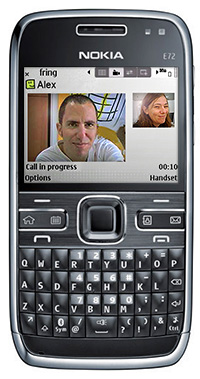
Now more good news! Today it’s Nokia E72 & E75 (and all other Symbian 9.3) users can video call with their friends on fring and Skype for free!

All Nokia Symbian users, we’ve got news for you too! The newest version contains some quality improvements, bug fixes and better connectivity in some specific scenarios – so we highly recommend that you get the latest and greatest version, as well.

How do you get it? Simply go to fring’s download page and get it today!

We have some more news coming for you in the next few weeks so stay tuned.

The fringTEAM

Hurray! Video Calls available for more Nokia devices!

Monday, February 15th, 2010

Start video-calling your friends for free, from anywhere, on your mobile phone today!

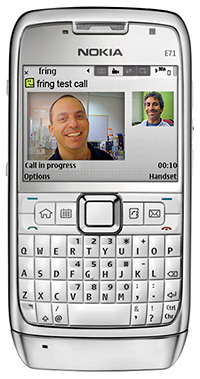
After fring launched the world’s 1st video calling over Internet on Nokia touch devices, 2 months ago, we heard lots of requests for video on more phones, thus we are adding today video support to most of Nokia’s popular 9.2 series phones, including the ever-popular E71, E51, E66 and more.

Other Nokia device owners, worry not- fring will add video support for even more Nokia devices operating on Symbian 9.3 OS in a week or so…so keep following our blogs for the latest news!

So start practicing on your smile as fring video calling is coming your way in 10, 9, 8….

The fringTEAM

World’s first VoIP Video calls fring2Skype and Skype2fring

Tuesday, November 24th, 2009

Only a week after releasing our Android version, we’re very excited to announce the healthy arrival of….the world’s first mobile video calls over internet! (with fring and Skype video calls :-) )

Now for the first time ever fringsters can make and receive internet video calls from mobile devices (for free!), picking up your fring and Skype video calls from the road, and seeing the person you’re talking to from your mobile phone.

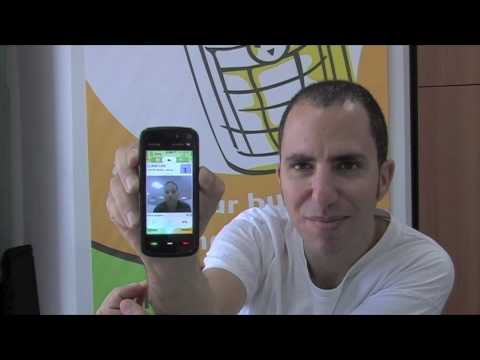
fring video is currently supported on Nokia touch (such as X6, N97 mini,N97, 5800), N95, N95 8G and N82 devices.

Coming soon on other popular platforms so stay tuned!

YouTube Preview Image

WARNING: When NOT to fring video:

  • When picking up a call from the toilet
  • While cheating on your boyfriend
  • While at the beach after you called in sick this morning

Download the new fring version with video here and…ready – set – action!

The fringTEAM

fring for iPhone over 3G on its way!

Saturday, October 10th, 2009

We’re very excited about AT&T’s announcement today (confirmed by Apple) that its 3G wireless network will be open to third-party Internet voice applications on iPhone.

Until now fring users could only use fring on their iPhone over Wi-Fi, so this comes as great news for us and our iPhone fringsters.

iphonescreenshots 001

fring’s dev team is hard at work, making sure we will be ready to go once 3G iPhone gates are open . We will be live before you can even say “fring for iPhone over 3G on its way!” with the new feature-packed version we released just today… but also over 3G!

fringTEAM

Feature highlight – merging contacts on 3.40

Monday, June 22nd, 2009

It seems that you guys really like the new 3.40 version - that’s great!

Some of you have asked about the manual contact merging, so here’s a little explanation for you:

How does it work?

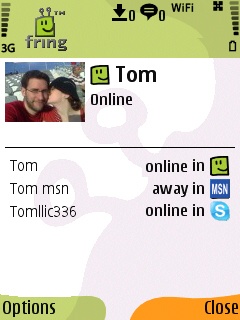
I have a friend called Tom. Now, Tom is such a good friend of mine that I’ve added him as a friend on MSN, Skype and fring.

On the new 3.40 version I can merge Tom’s entity from these services into one contact on my fring buddy list. Sounds convenient, isn’t it?

How do I do that?

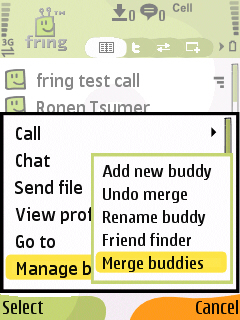
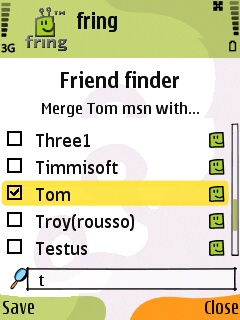
Highlight your buddy on the buddy list and choose Options –> Manage buddies –> Merge buddies.

menu friendfinder

2. Check the box near the contact or the contacts you would like to merge with your buddy and click Save.
This process can also be done directly from my buddy’s profile screen by highlighting your buddy, choosing Options –> View Profile –> Options –> Merge buddy.

Cool. The first step is done.

profile


How do you call/chat this contact?
I see that Tom is now online and I wish to make a call to him. I choose him from the contact list and hit the green button. I’ll choose the service I wish to use and click the joystick.

To start a chat with Tom I can click on ‘options‘ –> ‘Chat‘ and start typing my message. Now, the first message will be broadcasted to all the services that Tom is currently available on. The conversation will continue on whatever service Tom will choose to reply on. Simple.

As always, we’d love to hear your thoughts and comments about this feature and about the brand new 3.40.

Page 1 of 212»