Southafrica

Archive for July, 2009

Feature highlight: Push notification

Saturday, July 25th, 2009

So, you’ve all been very excited about the new ‘Push notification’ we released last week but since it’s a new feature on the iPhone 3.0 firmware some of you had a few questions about it. So let’s dive in and explain it a bit further:

Using the new Push Notification capability, you can now be notified when you receive a call or a chat when fring is not running.

Note: Push Notification is only available on firmware version 3.x or newer. If you are using an older firmware version, you can use the “Always-on” add-on.

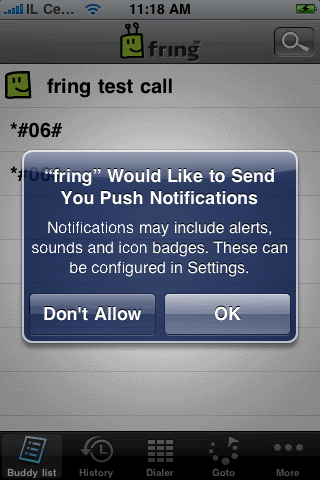
Once you register to fring and run it for the first time, you will see this message on your screen:
IMG_0023

Choose OK and your contacts will continue seeing you as ‘online’ once you exit fring and will be able to send you chat messages and to call you.
Choosing Don’t Allow will dismiss this window and you will not get notifications.

Note: Once you exit fring, your contacts will see you online and you’ll be available for the next 6-8 hours. We’re still fine tuning this period based on your feedback.

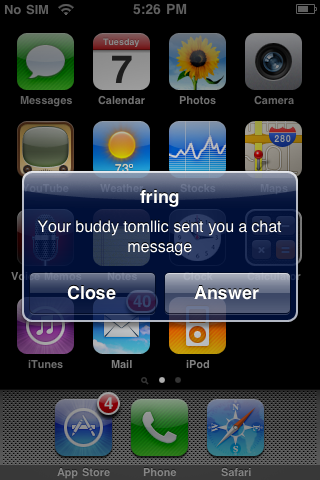
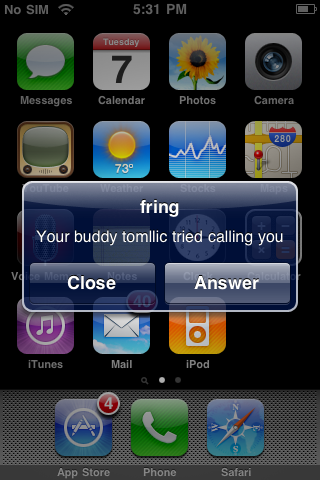
When a contact will send you a chat message or try to call you while out of fring, you’ll receive these notifications:
IMG_0019 IMG_0021

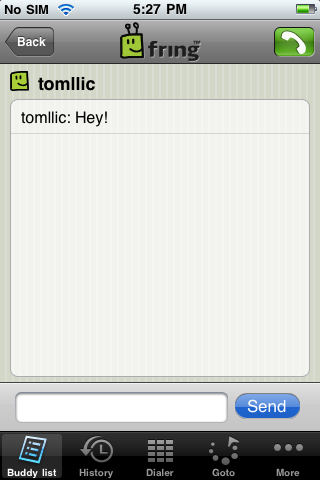
If you choose Answer, fring will launch and these windows will follow:
IMG_0020 IMG_00233

Note: if you choose Close, you will not be available any longer and your contacts will see you offline until the next time you launch fring.

Temporarily disabling Push Notification

If for some reason, you don’t want that your contacts to see you online when fring is not running, you can temporarily disable Push Notification. Just open fring, click on More –> Go Offline –> click Offline again. Quick & easy.

Well, seems that we covered most of this feature. If you have any questions feel free to post them here and we’ll be happy to answer them.

The fringTEAM
Meet the worlds first C5 quadriplegic fringster

Friday, July 24th, 2009

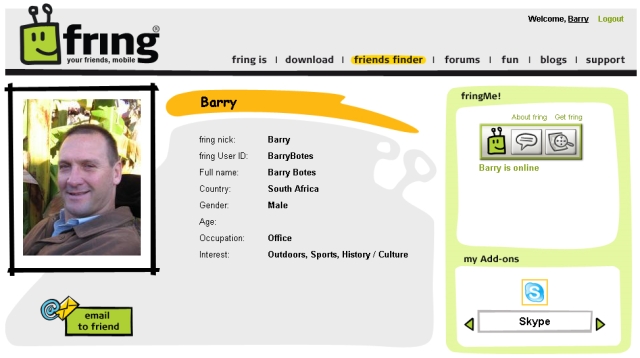
fringsters, Meet Barry Botes a dynamic quadriplegic fringster from Johannesburg, South Africa.

Barry is officially (as far as we know) the world’s first C5 quadriplegic fringster.

barry

Shot during a car hijacking in 1994, Barry and has been left totally paralyzed from the neck down, he is classed as a C5 quadriplegic which means that he cannot use his hands or feet. This “temporary setback” as Barry calls it, has not stopped him from living life to the full.

Barry is the founder of a unique NPO called Ama Wheelies which aims to help quadriplegics become self sustaining. The project also aims to provide accommodation and business opportunities for quadriplegics living in Thaba Chweu, South Africa.

Barry is also a member of the newly formed ‘South African Property Maintenance Assessors Guild’. Barrie’s role sees him traveling to clients premises assessing the facilities and then either certifying the building wheelchair friendly or providing a report on what needs to be upgraded to make the building friendly to the disabled folks of South Africa.

fringsters feel free to follow the Ama Wheelies project on their website, blog, Twitter, facebook or flickr.

If you happen to be in a fringing giving mood you can also donate to this amazing project by clicking here.

How does a quadriplegic use fring?

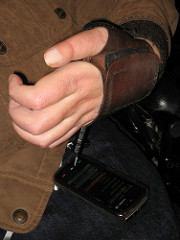
After a recent road trip with Barry to the world famous Kruger National Park, your local fring blogger introduced Barry to the sexy Nokia 5800, I thought a few days of testing would see if this great new touch screen handset would make life easier for quadriplegics. The results I must say are very good. For the first time since being shot Barry can now, make and receive phone calls, send and receive SMS and yes even use fring without the need for assistance, something that Barry has for a long time been working hard to achieve. Never before has this been possible, all other handsets on the market are inconvenient to use, or are way too expensive. For the first time ever it is now possible for a C5 quadriplegic to not only use a cellphone easily but also to afford it. The Nokia 5800 is the only handset that makes this possible and I think a huge shoutout to Nokia is in order for this achievement.

Thanks Nokia you guys rock! Even if you didn’t design this handset for the disabled, it sure is benefiting them.

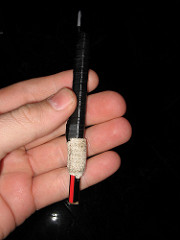
So getting back to using the handset, Barry got me to put this unique quadriplegic stylus together. The stylus is easy to make DIY style and all that you would need is a pencil, a Nokia 5800 stylus 3cm of bandaid and some electrical tape.

I’d say the hardest part of the whole experience was actually purchasing the handset, once that and the unique stylus was done, it was smooth sailing, Well almost, the auto lock feature is a pain to operate without assistance, but Barry gets it right with some difficulty, we are thinking of adding something with a bit of superglue to extend the button and make it easier to use. They say practice makes perfect though and it’s good to see Barry practicing to improve his newly acquired cellphone and fringing skills.

From everyone here at fring a huge shoutout to Barry for becoming the world’s first C5 quadriplegic fringster. Welcome Barry we look forward to following your progress and the progress of Ama Wheelies in the next few months.

Disclosure: Barry Botes is a relative of our South African fring Blogger.

G-connect and the chronicles of the Broadband price war

Wednesday, July 22nd, 2009

The launch of the much anticipated Seacom cable into South Africa has for a long time been a hot topic. Some folks thought there would be a price war and others said it would take months to see any price reductions.

Well the good news fringsters is that the price wars have started and this the day before the official launch of the Seacom Cable. The very first contender in the ring, the boys and girls of G-Connect, who today announced that they would reduce their ADSL rate by 25% in anticipation of the Seacom cable launch which is scheduled for Thursday 23 July 2009.

The G-connect “price drop sees prepaid ADSL access rates decrease from 6.5c per MB to 4.9c per MB and during its happy-hour (between 5pm and 8pm daily) decrease to 4.5c per Mb from 4.7c per MB.”

Further good news for fringsters is that if you provision your 3G simcard with G-connect you can surf in 3G from your mobile device at rates far below the standard out of bundle network rate of R2 per MB. The G-connect standard 3G rate is 62c per MB and during their happy hour (5-8pm) it drops to 55c per MB. G-connect is a relatively new player in the market and these new rates are not bad for the new kid on the block if I may say so.

The G-connect team seems to be on the ball at the moment, they recently called me up and offered to send me a preconfigured simcard to trial the service and you can be sure I will let you guys know how the service performs.

Let the price war begin ;-)

Thank you! [Friends finder week]

Wednesday, July 22nd, 2009

Dear fringsters,

This is just a small thank you note to all of you who’ve taken part in our special Friends Finder week.

It’s been great to see so many of you create your own personal profiles, find new friends and discover old friends already on fring!

We hope you like the new Friends Finder tool and continue using it because the more fring friends you have, the more fringing fun you have!

Also note that the competition for the friendliest fringster ends this Friday, 24 July, so remember to send us how many new friends you added to fring during Friends Finder week (inviteafriend [at] fring.com). The top 5 friendliest fringsters will receive the very exclusive and cool fring t-shirt and notebook :-)

So thanks again for your enthusiasm – it’s been a great week!

Cheers,

The fring TEAM

Why should I add a picture to my fring profile [friends finder week]

Tuesday, July 21st, 2009

Now you have a profile. What’s next!? Make it ‘public’, so other fringsters can easily find you, and you never know- friendships are found in the least expected places (of course- you are free to search for whatever your heart desires, friendship being just one possibility :-) ).

How do you attract more people to your profile? Place your picture on it!

Research has shown that social-network subscribers with profile photos receive 30% more visits than those without. This makes sense because people like being visually stimulated. Simply put it- it makes your profile a lot more personal.

That’s what fring’s all about- freedom, sharing & social fun.

Update your profile today with a brand new picture: click login to enter your fring personal page–> edit –> under ‘my picture’ click browse –> choose the photo you’d like to add and click open –> click save and your’re done.

Spicing up your profile is as easy as that!

How to invite friends from the fring website [friends finder week]

Tuesday, July 21st, 2009

The new fring “friends finder” section on the fring website gives you many ways to invite new friends to join you on fring.

Invite by email: just enter your own & your friend’s email address to the form. You can enter multiple addresses by separating them with a comma. This is the email your friends will get.

Find on other networks: you can invite your hotmail, gmail. Yahoo mail & AOL mail friends to fring. It is sweet and simple; just enter your email service credentials onto the form, make sure you are logged into fring with your fring credentials, and click “Next”.

First, fring will locate your email friends that are fringsters. Next, you can easily invite them to become your fring buddies (use the “add as friends” button)

The second step is to send an email invitation to all your email friends that are not yet fringsters. Just use the “send email invitation” button. This is the email you will send them.

Note: All information is submitted securely & fring does not store any of this information. Your credentials are safe and fring will never use them again without your specific approval.

How to add friends on minifring [friends finder week]

Monday, July 20th, 2009

minifring is the chat only version of fring for low- end devices (J2ME). Here’s a little explanation for how to add friends to your minifring list.

You can search for a contact who has already registered with minifring / fring and add them to your contact list.

To search for a fring contact on the fring network:

1. From the contact list menu choose More using your left soft key.

The Options menu opens.

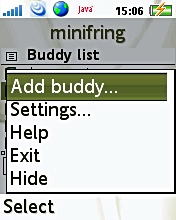
2. Choose the Add buddy option ‘More‘ –> Search phone book

addnewbuddy_minifring

Your address book will open. You can scroll and select ‘Select‘ on any contact. The contact’s phone number will be shown on the search screen and an option to ‘Add‘ or ‘More‘ will appear. If the user is already a fring user, the contact will be added to your contact list. If the user has not yet registered with fring or minifring, an SMS will be sent inviting them to join fring or minifring (depending on which version supports their device)

Page 1 of 41234»