Southafrica

Posts Tagged ‘AIM’

Feature highlight – merging contacts on 3.40

Monday, June 22nd, 2009

It seems that you guys really like the new 3.40 version - that’s great!

Some of you have asked about the manual contact merging, so here’s a little explanation for you:

How does it work?

I have a friend called Tom. Now, Tom is such a good friend of mine that I’ve added him as a friend on MSN, Skype and fring.

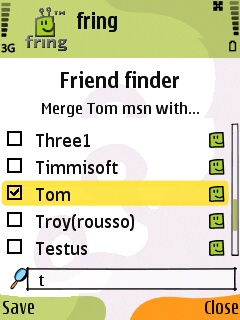
On the new 3.40 version I can merge Tom’s entity from these services into one contact on my fring buddy list. Sounds convenient, isn’t it?

How do I do that?

Highlight your buddy on the buddy list and choose Options –> Manage buddies –> Merge buddies.
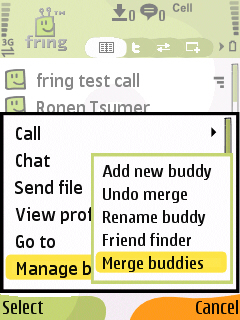
menu friendfinder

2. Check the box near the contact or the contacts you would like to merge with your buddy and click Save.
This process can also be done directly from my buddy’s profile screen by highlighting your buddy, choosing Options –> View Profile –> Options –> Merge buddy.

Cool. The first step is done.
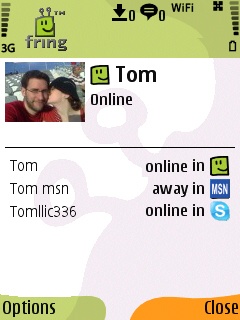
profile


How do you call/chat this contact?
I see that Tom is now online and I wish to make a call to him. I choose him from the contact list and hit the green button. I’ll choose the service I wish to use and click the joystick.

To start a chat with Tom I can click on ‘options‘ –> ‘Chat‘ and start typing my message. Now, the first message will be broadcasted to all the services that Tom is currently available on. The conversation will continue on whatever service Tom will choose to reply on. Simple.

As always, we’d love to hear your thoughts and comments about this feature and about the brand new 3.40.

fring - your friends, mobile

Thursday, April 2nd, 2009

Hey guys

Did you know? With the free fring mobile application you can take all your friends, mobile.

If your favourite network is not yet supported, please drop us a line and we will work on adding it ;-)

Top 10 Nokia 5800 Xpress Music applications

Monday, March 23rd, 2009

Having just upgraded my handset to the shiny new Nokia 5800 Xpress Music aka Tube, I thought it good to do a post showing the applications I have personally found to be the most useful on my 5800.

There are currently not many applications that support this sexy handset but given some time I am sure many new apps will become available.

Please note that my list of top 10 must have apps for the 5800 includes both free and premium services.

  1. fring - Lets you talk, chat and interact freely between: Skype, Yahoo, MSN, ICQ, Twitter, Facebook, GoogleTalk, AIM, SIP, Gmail Notifier, LastFM, Orkut and Yandex
  2. JoikuSpot - Turns your mobile handset into a secure WLAN (Wi-Fi) HotSpot.
  3. Gmail - Google’s free email service - this is the best email service on earth.
  4. Google Maps - Possibly the best free mobile mapping software available.
  5. Opera Mini - The world’s most popular mobile Web browser
  6. File Zip - Easily zip and unzip files on your 5800 - Get it from the download menu on your handset.
  7. Accuweather - The best weather application on the 5800. It’s also in the download menu on handset.
  8. Best Screensnap - A cool application for taking screenshots. In the download menu on handset.
  9. Photoflow - This is a great application for viewing images. In the download menu on handset.
  10. Paint Pad - For those of us who love to draw. Available from the download menu on handset.

This is my current Top 10 and when more applications become available the list will change ;-)