Southafrica

Posts Tagged ‘iphone’

Multi touch iPhone OS desktop monitor anyone?

Monday, June 15th, 2009

The guys over at Crunchgear are reporting on this amazing hack or hoax that surfaced on the weekend. Apparently “Some intrepid hackers have run what appears to be iPhone OS 2.x on a “multi-touch” monitor with accelerometer support.”

A Swedish design firm called Dreamfield has accepted responsibility for the video claiming the device is something out of their “labs”. People everywhere are calling this a hoax. All I can say is that even if this is a hoax, the idea is genius and I can’t wait to purchase a device like this in the very near future ;-)

Apple iPhone 3G S coming to South Africa July09

Thursday, June 11th, 2009

Some more great news for fringsters in South Africa. It is being reported that the much anticipated Apple iPhone 3G S, will soon go on sale in South Africa. According to the chief communications officer at Vodacom, Dot Field, “Vodacom will launch the iPhone 3G S, the fastest most powerful iPhone yet, in South Africa in July 2009″ Sadly though, no exact date or price was given.

Man I wish I could get this device a few days before the launch to play around with and report back.

You ask and fring delivers fring 3.4 – Socialmashing

Wednesday, June 3rd, 2009

Attention, Attention, drum roll… we’re very excited to announce that fring version 3.4 has just gone live.

As you probably already know most of us have several social circles developing in parallel, I mean who uses only own social tool these days? At fring we’ve been listening to what users of social media really want, and especially our community of fringsters, using this valuable feedback from the community we came up with a few new solutions mashing up all your separate communities of friends into one manageable, mobile interface via fring.

From now on, fring lets you easily create one rich, dynamic profile for each of your contacts so you can see what anyone is up to at a glance, and interact via all your mutual social networks/services directly from one combined profile. It’s all happening on fring!

So what does it mean?

  • No more multiple listings for the same friend!
  • Viewing a fringster’s profile, you can see whether he’s currently available via fring, Skype or MSN, and other IM services.
  • We “hint” you when a friend from your regular phone book or another social network like Skype, AIM etc is also a fringster so you can add them to your fring friend list and complete their personal profile.
  • You can control how your fring world sees you! You can update your own fring profile photo, mood status and nick name

How do you do it?

  • To merge together multiple contacts, follow these steps: In buddy list, select the user you want to merge > Go to “Manage buddies> choose “Merge buddies”> it will take you to your buddy list. Scroll down to other names for the same contact that you’d like to merge > Click OK to check the box next to each > Hit Save. You’re done
  • To update your profile click on Options> Edit my profile> Options> and choose Update picture/ Update mood text/ Change nickname.
  • When initially registering to fring, you will be alerted of all your GSM and social community friends who are already fringsters. Once you start using fring, we’ll let you know when other friends become fringsters by clicking Options>Manage buddies > Friend finder.

These new features currently work on all Symbian devices; Windows Mobile and iPhone are coming soon. Full feature- list for the new version can be found here. Get your new version today.

A full feature- list for the new version can be found here.

Official press release is available here.

Have fun - and as always, let us know how the new unifying fring works for you!

fring Team

Feature highlight: Always-on

Monday, April 6th, 2009

Hi guys

As you know, we released the new iPhone version a few days ago and the feedback so far has been great!
Several people have asked us about their always-on presence option even when fring is turned off, so here is a communal explanation for y’all:

The new Always-On feature keeps you logged into fring even when the fring application is closed on your iPhone/iPod touch.

It works like this:

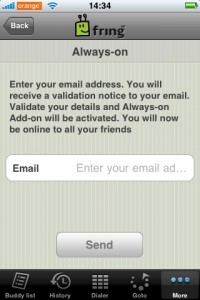
To activate the Always-On add-on, click on ‘More‘ –> Add-ons –> Always on.
You’ll get the following screen
3

Enter the email address you have configured into your iPhone and click ‘Send
Within a few seconds you should get an activation email. Open the email on your iPhone and click the link to activate the service.

Once you’ve clicked the link and activated the service you can click the home button and fring will keep you logged in. This of course works with all the services you use on fring ( fring, Skype, MSN, Google talk, ICQ, Yahoo etc)

How do I get the notifications?

To get the notifications in real time you should have your email address configured to be “pushed” to your iPhone/iPod. Once you got that done, you’ll get an email whenever someone’s trying to call/chat you. Just open the mail and click the link –> fring will open up on your phone and display the message.

If you don’t click the link within 5 minutes - we will log you off from the Always-on service and won’t send you more notifications until you log in again to fring (we don’t like spam…)

I’ve registered to the add-on, Now I want to go offline, How do I do that?
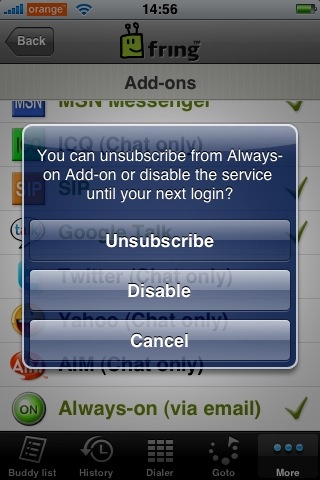
1

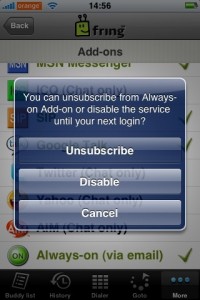
Open fring, click on ‘More‘ –> Add-ons –> Always-on.

You’ll get the above pop up. If you click on ‘Disable’ we will log you off from the service until the next time you open fring. Or, you can unsubscribe from the add-on completely (but why would you want to do that ! ? :-) )

A few things:
1. Currently this feature is available for UK and US users only but no worries… we will gradually make it available to all countries.
2. Once you’ve subscribed to this service we will keep you online for between 2-4 hours. This time frame may vary based on country as we are still fine-tuning this process in order to optimize your experience.
3. As we mentioned in the initial blog post, this feature will eventually use Apple’s 3.0 firmware notification SDK, once it’s made publicly.

We are hoping to add more countries in the next few weeks so stay tuned for more news.

As always, your comments and feedback is much appreciated!

The fringTEAM

Goodnews for iPhone and iPod Touch fringsters: update

Saturday, April 4th, 2009

Hey guys,

We have just released a new version of fring for the iPhone.

This updated version includes:

  1. Improved dialer (a drop-down list with country flags, saves typing in the country code)
  2. Improved GUI
  3. New ‘Settings’: Hide/show phone contacts; hide/show offline users
  4. A few Bug fixes ;-)
  5. Always-on Add-on

The “Always-on Add-on” is designed to solve the fact that Apple doesn’t allow application to run in background. This is how it will work:

  • iPhone fringsters subscribe to the add-on in order to use it (through the add-on catalog)
  • Once you log out of fring, your buddies will still see you as logged in (green) if they message you, you will get notifications by e-mail whenever someone calls/chats.
  • The e-mail is sent to your mail client on the device itself and contains a link.
  • The link takes the fringster directly to the message he’d missed on fring itself.

This feature will be rolled- out gradually, 1st in the US & UK…the duration of which your friends will see you as “online” may vary, based on your geo location and will be adjusted by us, over the next few days, based on users’ feedback” This service will eventually be in line with Apple’s 3.0 firmware and new notification feature.

To get it, simply download the update from App Store.

As always, we’d love to get your comments and remember if you continue to give us your great feedback, we’ll continue to make fring even better!

Google Maps updates South Africa

Thursday, February 26th, 2009

I recently wrote a post about Googles new Latitude application, in that post I slightly criticized Google for their poor roadmaps in South Africa. “Sadly though Google’s street maps in South Africa are really poor and half the time you can’t see the roads. Lets face the facts, the satellite images may be cool but they don’t really help much when navigating in a hurry.”

Well the good news for this week is that Google must have read my post and they have finally turned their attention to South African roads. Although there is still alot that needs attention for their South African road Maps, it sure is a good step in the right direction.

To see the new maps follow this link and search for your local town. http://www.google.com/maps

Oh btw the street maps in Google Mobile Maps (Symbian) are still outdated for some reason, so don’t get to excited. They are however all live on the PC and via the iPhone.

With the 2010 soccer world cup just around the corner, it’s good to see Google is finaly mapping our part of the world. I wonder when the google street view car will start mapping our roads ;-)

5fm invites listeners to pimp their cellphones with fring

Friday, January 9th, 2009

Hey guys,

I was just tipped off about a blog post by the hot and sexy 5fm DJ Poppy Tshongwana, Poppy is inviting her readers and listeners from the KFC Global Express to PIMP THEIR CELLPHONES “WITH THESE COOL MOBILE APPLICATIONS

She goes on to say “Stop crying about the fact that you don’t have an iPhone - that doesn’t mean your phone is rubbish, you just need to beef it up a little and give it a second life.

The 5fm blog then goes on to list the mobile applications that they feel are “the best” and we are excited to say that 5fm not only thinks fring is “cute” they also feel we are one of the best. hehe

A big thanks go out to Poppy and the 5fm team for their vote of confidence, thanks also to the fringster who tipped me off about Poppies post ;-) Btw Poppy when are you guys going to integrate a fringME Widget into your site?

Page 3 of 6«12345»...Last »