Southafrica

Posts Tagged ‘iPod Touch’

New version for iPhone/iPod touch

Friday, December 18th, 2009

Hello fringsters,

We’ve just released a new version to the App Store (3.0.0.7). This is a small maintenance release for a better fring experience on your iPhone & iPod touch.

Main features:

  • Video quality improvements
  • Bug fixes
  • New video test call

I’d like to take this opportunity to thank you all for your great feedback and kind words about the recently released video feature. We’ll keep on working to improve it and bring more features, coming early next year.

Enjoy,

The fring Team

fringing iPhone/iPod version for the visually impaired

Saturday, November 14th, 2009

Hello fringsters,

This is a note to our visually impaired users:

We’ve been listening to your comments about fring’s latest iPhone and iPod touch releases and, while we’re rushing to the next (and exciting) version, we’ve created this special version of the previous release (1.2.0.9) especially for you.

This version is titled “fring – visually impaired version” and is available at the App Store.

Thanks for your patience.

The fringTeam

fring for iPhone over 3G on its way!

Saturday, October 10th, 2009

We’re very excited about AT&T’s announcement today (confirmed by Apple) that its 3G wireless network will be open to third-party Internet voice applications on iPhone.

Until now fring users could only use fring on their iPhone over Wi-Fi, so this comes as great news for us and our iPhone fringsters.

iphonescreenshots 001

fring’s dev team is hard at work, making sure we will be ready to go once 3G iPhone gates are open . We will be live before you can even say “fring for iPhone over 3G on its way!” with the new feature-packed version we released just today… but also over 3G!

fringTEAM

How to install fring on iPhone/iPod touch [friends finder week]

Sunday, July 19th, 2009

fring is available to download from the Appstore, completely free!

Go to the AppStore and search for fring.

Once the download is finished, a fring icon will appear on your iPhone/iPod touch desktop. Tap on it.

This will take you to the “Account setup” screen.

If you are a new user- choose “New user”. In case you’ve actually registered to fring in the past, no matter with which device, choose “Existing user” and login.

Now you are ready to fring- a- way.

Enjoy!

The fringTEAM

New fring version for iPhone/iPod Touch (1.2.0.4)

Monday, July 6th, 2009

fring’s new iPhone & iPod touch version , hitting the App Store today is aimed to improve the voice quality for fring VoIP calls. The new version also provides better connectivity and other quality improvements, all contributing to an even better fringing experience!

As some of you might have noticed, originally this latest version was to include Apple’s new Push Notification feature, which was later disabled due to some technical difficulties and will be available on fring’s next iPhone version, currently submitted to the AppStore. Stay tuned!

So go get the new version now and let us know what you think.

fringTEAM

Feature highlight: Always-on

Monday, April 6th, 2009

Hi guys

As you know, we released the new iPhone version a few days ago and the feedback so far has been great!
Several people have asked us about their always-on presence option even when fring is turned off, so here is a communal explanation for y’all:

The new Always-On feature keeps you logged into fring even when the fring application is closed on your iPhone/iPod touch.

It works like this:

To activate the Always-On add-on, click on ‘More‘ –> Add-ons –> Always on.
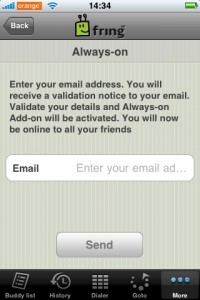
You’ll get the following screen
3

Enter the email address you have configured into your iPhone and click ‘Send
Within a few seconds you should get an activation email. Open the email on your iPhone and click the link to activate the service.

Once you’ve clicked the link and activated the service you can click the home button and fring will keep you logged in. This of course works with all the services you use on fring ( fring, Skype, MSN, Google talk, ICQ, Yahoo etc)

How do I get the notifications?

To get the notifications in real time you should have your email address configured to be “pushed” to your iPhone/iPod. Once you got that done, you’ll get an email whenever someone’s trying to call/chat you. Just open the mail and click the link –> fring will open up on your phone and display the message.

If you don’t click the link within 5 minutes - we will log you off from the Always-on service and won’t send you more notifications until you log in again to fring (we don’t like spam…)

I’ve registered to the add-on, Now I want to go offline, How do I do that?
1

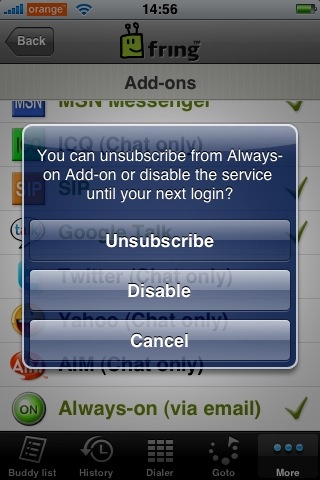
Open fring, click on ‘More‘ –> Add-ons –> Always-on.

You’ll get the above pop up. If you click on ‘Disable’ we will log you off from the service until the next time you open fring. Or, you can unsubscribe from the add-on completely (but why would you want to do that ! ? :-) )

A few things:
1. Currently this feature is available for UK and US users only but no worries… we will gradually make it available to all countries.
2. Once you’ve subscribed to this service we will keep you online for between 2-4 hours. This time frame may vary based on country as we are still fine-tuning this process in order to optimize your experience.
3. As we mentioned in the initial blog post, this feature will eventually use Apple’s 3.0 firmware notification SDK, once it’s made publicly.

We are hoping to add more countries in the next few weeks so stay tuned for more news.

As always, your comments and feedback is much appreciated!

The fringTEAM

Update: new version for 2.2 iPhone/iPod touch firmware

Wednesday, November 26th, 2008

Hi,

We have just released a new version for iPhone and iPod touch. This version (1.0.2.4) should fix the connection issues on the new 2.2 firmware.

Also on this version: French localization and bug fixes based on your feedback.

To get it, simply download the update from App Store.

And as always, we’d love to get your comments.

Page 1 of 212»