fring welcomes Android to the family
Wednesday, November 18th, 2009After weeks of speculation, rumors and alpha testing with our much-appreciated early access group, we are finally out with the 1st ever fring for Android!
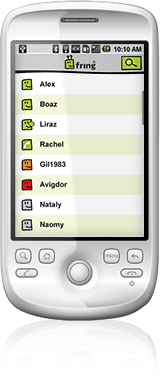
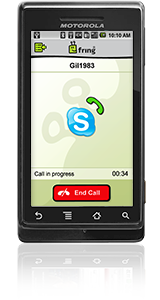
Thats right fringdroid-ers you can now get onto fring and make true VoIP calls over Skype, MSN, GoogleTalk and via hundreds of SIP providers (this btw is a world first). As always you can see real-time presence and live chat with your ICQ, Yahoo and AIM buddies too. You can also use Twitter there, as part of your integrated contact list.
fring on android works over 3G, GPRS or Wi-Fi internet connection.
What do you need to do to get your hands on this brand-new version?
You have 2 simple options for getting fring onto your Android device:
1. Get it directly from the Android Market:
• Start the Market application on your phone
• Search for fring and install
2. Get it from fring’s WAP site:
• On your Android phone, go to Settings > Applications and check the box to allow ’unknown sources’
• Point your phone browser to m.fring.com and download

A big thank you to our early access group for your invaluable feedback over the past few weeks!
Welcome to the big, happy, free fring family fringdroid-ers!
Known Issues (Will be fixed in the next version):
- GSM contacts do not appear in fring’s buddy list on DROID devices
- Call disconnection tone may be heard a few times when terminating a call
- SIP and SkypeOut calls are not yet available on DROID devices
The fringTEAM