


minifring is the chat only version of fring for low- end devices (J2ME). Here’s a little explanation for how to add friends to your minifring list.
You can search for a contact who has already registered with minifring / fring and add them to your contact list.
To search for a fring contact on the fring network:
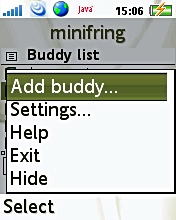
1. From the contact list menu choose More using your left soft key.
The Options menu opens.
2. Choose the Add buddy option ‘More‘ –> Search phone book
Your address book will open. You can scroll and select ‘Select‘ on any contact. The contact’s phone number will be shown on the search screen and an option to ‘Add‘ or ‘More‘ will appear. If the user is already a fring user, the contact will be added to your contact list. If the user has not yet registered with fring or minifring, an SMS will be sent inviting them to join fring or minifring (depending on which version supports their device)
Tags: friend finder week, fring, minifring


add me pls hamza60