United Kingdom

Archive for April, 2009

Now Your Nokia XpressMusic 5800 gets YouTube

Tuesday, April 28th, 2009

After the recent announcement of YouTube App for S60 devices, Nokia has finally released the app for S60 5th Edition devices. Now though the 5800 gets Youtube support there are several bugs and will be cleared over time. One main put off comes with the resolution of videos which is still QVGA making the videos pretty small on the large screen of the 5800. Another bug would be the jeypad disapperaing. Nonetheless the fact that we now have the app is great news and my co-fringer Simon our South African blogger I’m sure will agree.

Turkish fring blogger

Friday, April 24th, 2009

Following the enthusiastic response to our other localized blogs, we are happy to welcome Enes Kul to the fring team, Enes will be blogging for all our Turkish friends.

A warm welcome to the fring team Enes, we hope you will soon feel at home ;-)

fringsters, feel free to follow your new Turkish blogger here: http://www.fringcall.com/turkey/

Locate millions of free Wi-Fi hotspots today with new WeFi Add-on

Monday, April 20th, 2009

fring’s new WeFi add-on provides you with easy and free access to millions of Wi-Fi hotspots straight from your mobile devices, saving you valuable time looking for somewhere to logon, and providing you with affordable internet access while traveling either locally or internationally, for business or leisure.

To get the new WeFi add-on on your Symbian or Windows Mobile Device, you’d need to download fring’s latest version here. In order to locate and access millions of hotspots in your area, simply subscribe to the WeFi add-on from the add-ons tab within fring and start locating Wi-Fi hotspot closest to you, automatically, using your handset’s GPS, or manually by typing in any address worldwide.

YouTube Preview Image

Developers can start creating their own add-on’s today by using fring’s developers site where they’ll find the fring API documentation, code samples and open source add-ons (twitter and last.fm) which they can use to leverage their current web expertise (e.g. PHP, .NET, Java) to create their own mobile internet applications using the same tools they’d use to create any web application.
[Check this YouTube for more details]

Live chat with bowling legends Glen McGrath & Daniel Vettori

Monday, April 13th, 2009

mig33, has launched a new service to help Indian Premier League’s (IPL) Delhi Daredevils connect with their huge fan base in India and around the world through the mobile phone. As part of mig33’s Cricket FanZone, the Delhi Daredevil’s mobile fan club opens a range of new ways for fans to connect with other fans and to cheer their favorite team and players who will be playing in South Africa. After joining the mobile fan club, Delhi Daredevils fans can “watch” matches live with other fans on their mobile phones in dedicated chat rooms complete with live ball-by-ball commentary, receive important news updates from the team, meet new friends and buy official Delhi Daredevils virtual merchandise in the mig33 content store. Members also get access to the Delhi Daredevils Chat Stadium and chat live with their cricket heroes.

Delhi Daredevils’ current coach and ex Australian speedster Glen McGrath and New Zealand’s captain and spin wizard Daniel Vettori will be “cutting the ribbon” on the Chat Stadium and hosting its first event at 9.30 PM (IST) on Tuesday, April 14, 2009.

Delhi Daredevils fans can sign up by sending “DD” to 57575 or by downloading mig33 directly from their phone’s browser (m.mig33.com/dd). mig33 works on over 2,000 different mobile phone models.

Nokia N-Gage Gaming Service Now Live in India

Sunday, April 12th, 2009

Nokia has recently announced the launch of its gaming service, N-Gage in India. Now we will have official content customized for the Indian audience. Also users will now be able to purchase games, access services and pay for them in Indian currency. The N-Gage sub brand is a part of Nokia’s Internet services brand Ovi. Indian users get to choose from a catalogue of 30 titles developed by leading global as well as Indian publishers such as EA Mobile, Gameloft, Glu Mobile and India Games, in addition to Nokia Games Publishing. Nokia has also tied up with Oxigen, an Indian company involved in distributing and managing online Payment. Special pre-paid Oxigen e-vouchers which will be initially available at Nokia Priority Dealers (NPDs) in nine cities across the country & then further extend to other cities.

N-Gage will also give users an opportunity to try every game before they decide to purchase them. N-Gage games in India are priced in the Rs. 49-299 (inclusive of taxes) range. Current N-Gage supported phones include N81, N81 8GB, N82, N79, N85, N95, N95 8GB, Nokia 5320 XpressMusic and 6210 Navigator. More N-Gage supported devices will follow.

Coming Soon: Bluetooth 3.0 @ Wi-Fi speeds!

Sunday, April 12th, 2009

On April 21 the Bluetooth Special Interest Group (SIG) would announce specifications for Bluetooth 3.0. According to words floating around, Bluetooth 3.0 will dramatically increase transfer speeds enabling transfer of large files within seconds. Bluetooth 3.0 will also bring about a new feature called the Enhanced Power Control, this will reduce disconnections caused by movement between bluetooth devices.

The best news comes with the probability of Bluetooth to operate at Wi-Fi speeds through Generic Alternate MAC/PHY (AMP) a Bluetooth Profile. With this, users will be able to pair two devices and transfer data using WiFi. If WiFi is absent in one of the devices, transfer will be taken over through Bluetooth. More details will release once the SIG have a sit down and release the final specs of Bluetooth 3.0.

Feature highlight: Always-on

Tuesday, April 7th, 2009

Hi guys

As you know, we released the new iPhone version a few days ago and the feedback so far has been great!
Several people have asked us about their always-on presence option even when fring is turned off, so here is a communal explanation for y’all:

The new Always-On feature keeps you logged into fring even when the fring application is closed on your iPhone/iPod touch.

It works like this:

To activate the Always-On add-on, click on ‘More‘ –> Add-ons –> Always on.
You’ll get the following screen
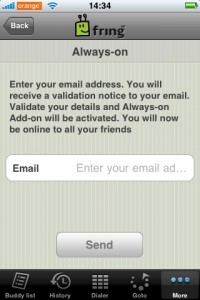
Enter the email address you have configured into your iPhone and click ‘Send
Within a few seconds you should get an activation email. Open the email on your iPhone and click the link to activate the service.

Once you’ve clicked the link and activated the service you can click the home button and fring will keep you logged in. This of course works with all the services you use on fring ( fring, Skype, MSN, Google talk, ICQ, Yahoo etc)

How do I get the notifications?

To get the notifications in real time you should have your email address configured to be “pushed” to your iPhone/iPod. Once you got that done, you’ll get an email whenever someone’s trying to call/chat you. Just open the mail and click the link –> fring will open up on your phone and display the message.

If you don’t click the link within 5 minutes - we will log you off from the Always-on service and won’t send you more notifications until you log in again to fring (we don’t like spam…)

I’ve registered to the add-on, Now I want to go offline, How do I do that?
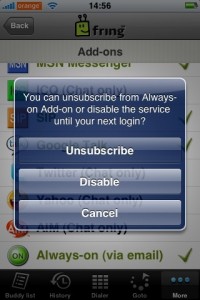
Open fring, click on ‘More‘ –> Add-ons –> Always-on.

You’ll get the above pop up. If you click on ‘Disable’ we will log you off from the service until the next time you open fring. Or, you can unsubscribe from the add-on completely (but why would you want to do that ! ? :-) )

A few things:
1. Currently this feature is available for UK and US users only but no worries… we will gradually make it available to all countries.
2. Once you’ve subscribed to this service we will keep you online for between 2-4 hours. This time frame may vary based on country as we are still fine-tuning this process in order to optimize your experience.
3. As we mentioned in the initial blog post, this feature will eventually use Apple’s 3.0 firmware notification SDK, once it’s made publicly.

We are hoping to add more countries in the next few weeks so stay tuned for more news.

As always, your comments and feedback is much appreciated!

The fringTEAM

fringsters join the tweder (Twitter Seder)

Tuesday, April 7th, 2009

Twitter is throwing the biggest live Passover Seder in the world and fringsters are invited to take part!

If you want to be a part of this historical Twitter Seder, or as they call it the Tweder, you can use fring to join in live on your mobile phone, straight from your festive dinner table this Passover eve!

Just make sure you’ve signed in to the Twitter Add-on within fring (select Twitter 2.0 for the new feature-filled version).

You’ll get regular updates and can always see if you’re ahead or behind the tweder without spilling matza-ball soup on your laptop or leaving the room to check on how the Tweder’s going.

Follow the tweder via fring live on April 8th through 470 years from slavery to freedom, 140 characters at a time.

Freedom has never been so liberating!

The fringTEAM

iPhone new version in the App Store Now

Sunday, April 5th, 2009

Just a quick shout to let all of you iPhone & iPod touch fringsters know that there’s a new version of fring in the App Store with some extra functionality you guys asked for, providing an even smoother fringing experience.

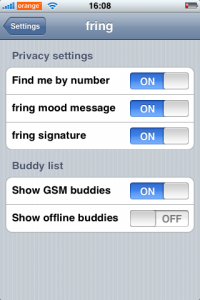
You can now choose whether to show or hide your Offline contacts and regular GSM buddies. And for convenience, we’ve moved fring settings to the general iPhone settings, so there’s no need to open fring each time you want to make a small change.

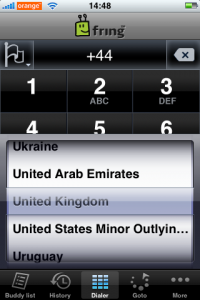
You’ll also notice a small flag symbol in the top left hand corner of the dialer screen, Tap this and you’ll get a list of countries. Select the one you’re calling and the International dial code will automatically be entered making overseas Skype Out and SIP calls even easier.

We’re also just finishing off a notification add-on for this version. This add-on will notify you when your friends are trying to connect with you whilst your fring is closed. This of course includes all the different services (Skype, MSN, Google talk etc)

To make this as useful as possible, we are conducting a gradual roll-out, starting with the UK and US. This service will eventually be in line with Apple’s 3.0 firmware and new notification feature.

YouTube Preview Image

You can download fring’s new version here.

Continue to give us your great feedback, and we’ll continue to make fring even better!

[Update]: For thos of you who can not find the privacy settings… We moved the settings screen to the iPhone’s main settings menu. So just click on ‘Settings’ from the main springborad –> scroll down –> fring.