


Voice and Video chat now in Gmail
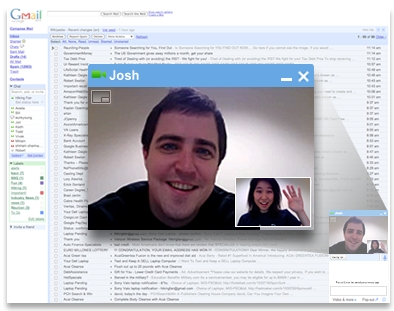
Gmail already has its chat i.e. Gtalk integrated into its web app. Now what’s better is that through that same very page where you have your mail and your Gtalk contacts you can now voice and video chat with them. Gmail’s Gtalk web app has just recently added new emoticons making it more fun to chat via the web app. This feature uses Internet standards such as XMPP, RTP, and H.264, which means that third-party applications and networks can choose to interoperate with Gmail voice and video chat.

To get started hit the link in the top right in your Gmail app reading - “New! Video chat” or head to http://gmail.com/videochat. Once you install the plugin, to start a video chat, just click on the “Video & more” menu at the bottom of your Gmail chat window, and choose “Start video chat.” You’ll have a few seconds to make sure you look presentable while it’s ringing, and then you’ll see and hear your friend live, right from within Gmail. You can click the “pop-out” icon to make the video larger, or click the fullscreen icon in the upper left-hand corner for a fully immersive experience. Gmail is also offering a few webcams with special discounts through November 30th.



Fring mobile vhdeo chat