Category ArchiveProduct
News & Product & Release & Symbian & Updates ephraim on 24 Feb 2013
We are moving forward…
fringer friends, in recent months we launched major upgrades of the fring applications for Apple, Android and Symbian devices, introducing a completely redesigned user interface, further improvement in the quality of our voice and video calls and support for using fring on several devices at once.
If you still use our older versions you have received by now several messages informing you about the new app availability with a direct link to the upgrade to facilitate the process. You have also been informed that in the coming days we will no longer be able to provide service to older versions.
Please understand that in order to guarantee a high quality of service to our entire customer base we must ask the remaining users of older versions to upgrade immediately.
Make sure your device is running a recent fring version:
• Ver. 7.2 (for Symbian 9.2 and above) http://bit.ly/VOfLuU
• Ver. 4.0 (for Android 2.2 and above) http://bit.ly/U2ETwg
• Ver. 6.0 (for iOS 4.3 and above) http://bit.ly/WQtnm9
In the coming days our service for older versions will be gradually suspended - unless you upgrade you will not be able to connect to the network.
fringOut users that upgrade and register with their phone number will see their existing fringOut balance automatically. Users that reinstall fring from scratch can restore their existing balance here: http://bit.ly/XBdtNR
We thank you for your support and invite you to move forward to a better and faster fring!
Product admin on 29 Mar 2011
Product Team update: Behind the scenes of the latest fring for iPhone
Hi fringsters,
I’m back again with some more ‘behind the scenes’ product insights.
Following our latest iPhone release, the one with the cool camera flip and the iTunes fringOut credit purchase, we saw that some of you were asking “Where did all my friends go? I used to have a full buddy list, but now it’s nearly empty and I can’t even re-add my missing buddies”.
Well, one of the changes we’ve made in this version was displaying only online buddies. We’ve figured that you simply can’t video call friends who are currently offline, or call your contacts using fringOut without having any fringOut credit. Therefore, by displaying only online buddies, you get a shorter, more relevant, and infinitely more interactive buddy list. Of course, all the offline buddies are still there, and will be displayed again when they come back online. Address book contacts are displayed as soon as you’ll purchase fringOut credit.
Basically we moved from the crowded —> to the easy on the eyes
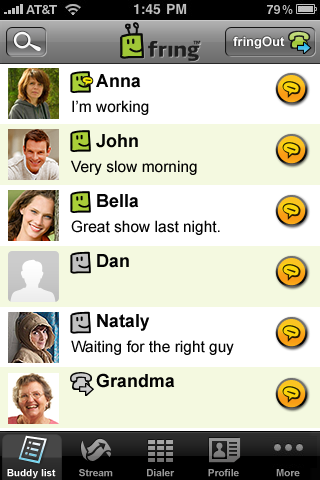
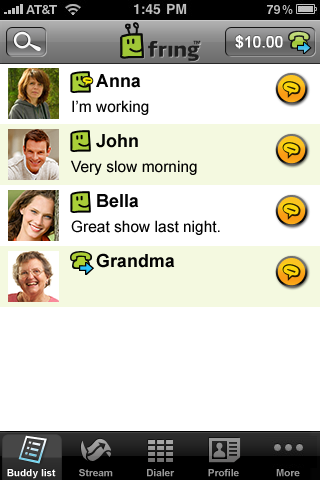
However, for those of you who still wish to see all the buddies, go to your device’s settings, click the line with the fring icon, change the setting named “Show offline buddies” to “ON”, and restart fring. We know it’s outside the application, but that’s the way things are done in the iPhone world. To view all the address book contacts use the “Manage add-ons” option in the “More” tab of the application.
As always, feel free to comment to help us make an even better fring for you. We hope you’ll enjoy our new version – let us know what you think!
Cheers,
Gilad
Android & Around the fring & Feature Highlight & Product admin on 17 Feb 2011
Product Team update: Behind the scenes of the latest fring for Android
Hi guys,
I’m Gilad from fring’s Product team, and I am excited to be writing to you on our blog for the first time. I want to share with you some behind the scenes stuff going on here at the fring HQ.
As you know we released a new Android version (Feb 3rd) which included our new notifications bar and activity log.
Our thinking behind this was how to provide instant information about activities that go on in fring. We wanted to address everything from missed calls, incoming chats, through to new friends’ alerts, as well as reminding you that fring is up & running.
And indeed, with the version, we saw a huge jump in people using fring daily. So that seemed to be working well.
However, just after the launch our Android development team leader, Guy, saw your comments about the permanent fring-is-running icon.
Your comments ranged from:

To:

So we sat down to re-think this, and think about what is more important – a constant reminder that fring is up & running, or letting fring run in a less visible way? Our solution – do both!
We decided to remove the fring-is-running icon by default from the notification bar, but this can be easily changed to see it in the application’s settings if you want to.
Thus – giving you the option to select which option works best for you, while still improving fring’s visibility.
We hope you like our new version – feel free to comment some more and help us make an even better fring for you.
Cheers,
Gilad