Category ArchiveAndroid
Android & Early Access ephraim on 30 Mar 2011
Wanna try fring video calls on your HTC Thunderbolt?
We’ve had tons of requests from Thunderbolt users over the past few days to release a version which supports the front facing camera on this bad boy.
So especially for all of the fring video callin’ junkies out there who just couldn’t wait another second to get it, we have a special early-release for you
To get it, just simply drop us a line and we’ll equip you with the new build so you can enjoy video calling your friends on your Thunderbolt.
Cool ? you betcha !
As always, feedback and comments about this early release are welcome.
The fring Team
P.S.
There are still some more invites to the Motorola Atrix and Dell Streak beta. Contact us quickly to get on board.
Android & Around the fring & Feature Highlight & Product admin on 17 Feb 2011
Product Team update: Behind the scenes of the latest fring for Android
Hi guys,
I’m Gilad from fring’s Product team, and I am excited to be writing to you on our blog for the first time. I want to share with you some behind the scenes stuff going on here at the fring HQ.
As you know we released a new Android version (Feb 3rd) which included our new notifications bar and activity log.
Our thinking behind this was how to provide instant information about activities that go on in fring. We wanted to address everything from missed calls, incoming chats, through to new friends’ alerts, as well as reminding you that fring is up & running.
And indeed, with the version, we saw a huge jump in people using fring daily. So that seemed to be working well.
However, just after the launch our Android development team leader, Guy, saw your comments about the permanent fring-is-running icon.
Your comments ranged from:

To:

So we sat down to re-think this, and think about what is more important – a constant reminder that fring is up & running, or letting fring run in a less visible way? Our solution – do both!
We decided to remove the fring-is-running icon by default from the notification bar, but this can be easily changed to see it in the application’s settings if you want to.
Thus – giving you the option to select which option works best for you, while still improving fring’s visibility.
We hope you like our new version – feel free to comment some more and help us make an even better fring for you.
Cheers,
Gilad

Android & News & Updates ephraim on 13 Jun 2010
Android Video Calls – You can’t Get Enough!
fringsters, we love the great response to Android video calls.
From our last blog post, we’ve found out that:
- 54% of you are video calling your lover/partner
- 22% your kids/grand-kids.
- Only 7% told us that you are video calling your turtle 
Now, with this latest release, we have worked on your feedback to include quality improvements and support for more Android devices including the Dell Streak, Sony Ericsson X10 and more.
You’ll also notice the ads that enable us to keep all the video calls free.
So try video calling with the latest fring for Android here now !
The fringTEAM
Android admin on 07 Apr 2010
Android Users- you fring, but do you MEGAfring??
We’ve been getting great feedback from Android users on the latest release. Thanks for the feedback.
Most Android users are on mobile phone, but did you know that fring works all types of Android devices including “Mobile Internet Devices” (aka ‘MID’s).
Check out fring in action this cool Camangi Android webstation.
If you’ve got one of these Android MIDs, send us your fring demo video in the comments below.
Android & News admin on 18 Mar 2010
New Android version with brand-new look, dialer and more!
Great news for our Android fringsters- only a few months ago fring’s launched its 1st Android version with the world’s 1st ever Skype VoIP calls and the version is quickly catching up with fring’s other leading platforms. Today’s version includes a new buddy list look, brand-new profile screen and the long-anticipated dialer, among other improvements.
First, we’ve updated the buddy list and made it a lot friendlier. The new buddy list features your friends’ picture and mood line as does your call screen.
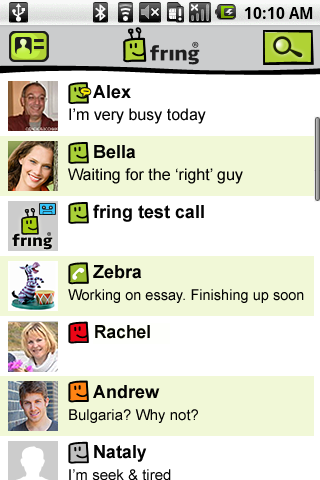
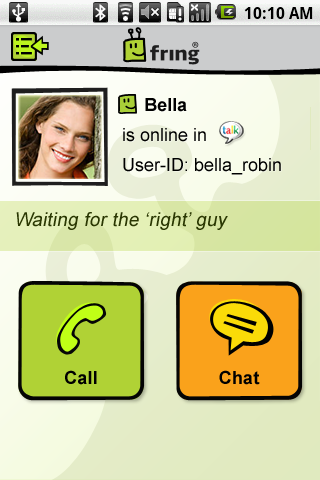
Personalize your profile! The new version comes with a new personalized profile, where you can upload a picture & edit your mood, your email address and phone number, all at the click of a button.
Then, you asked for it and you got it- we’ve added a dialer screen (including DTMF), so you can dial in numbers during a call.
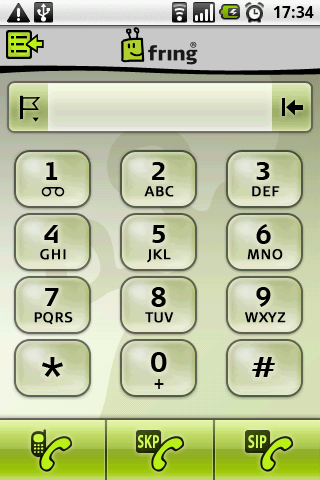
Lastly, you’ll love the voice improvements, Links support in the chat screen and other bug fixes we’ve added to this version, to make sure you get an even better communication experience.
So, now you have even more reasons to make sure you get the latest version today, because fring’s just gotten a lot more social on Android!
Download the new version here.
The fringTEAM
Android admin on 02 Feb 2010
Android update: Fix for Brazilian Milestone
Hi There,
We’ve just released an updated version of fring for Android.
The version (1.2.0.26) should fix the crash users from Brazil and Argentina reported on Motorola Milestone.
The version is now available through the market and from our website.
I’d like to thank our community for helping us identify this bug and issue this fix so quickly.
Android & News admin on 21 Jan 2010
New versions for Symbian and Android
Listen up Symbian & Android fringsters!
As you know, at fring we keep listening to your requests and aside from bringing you the latest and brightest your mobile can offer- we work hard to improve what’s already out there.
Symbian users- pay attention…
- Changing your status is now as easy as 1,2,3. Let your friends know if you are online, offline, busy, or you can just stay invisible if you don’t want to be disturbed; all in the click of a button!
- And yes- you’ve been asking for it and it’s finally here- DTMF. Now dialing “#” (“pound”) and “*” sign (“star”) is possible to use within a call through the new fring dialer.
*Bonuses for our Nokia touch users…
- Twitter 2.0 just got a brand-new look, making it easier for you to post your tweets, re-tweet and follow friend’s, from wherever you are. See full tweets and links on one screen & easily navigate between them.
- Like your chats to be even livelier? You’ll love live links inside your fring chat.
Also as you may recall, we previously launched our in-chat advertising a few months ago. Now we are expanding our ads campaign into additional Symbian devices.
Android users- worry not, we are not leaving you out. A new and improved version is now out for you too. The new version includes voice, connectivity and stability improvements in addition to the following requested settings:
- Hide/Show offline buddies
- Hide/Show address book
- Privacy settings for IM signature and mood message
- A fix for the audio issues on Motorola DROID and Milestone
- Better support for Google’s Nexus One
- Bug fixes (thank you all for your feedback!)
See full list of new Symbian version 4.1 & Android version 1.2.0.25 features here.
Download the new versions today!
**Video update:
We know that some of you are still waiting for more devices to be supported with video calls (yes yes, E71 users… we know you’re out there), so the news is that we’re working on it. We’ll be supporting more devices soon so stay tuned.
We are kicking in the New Year with more customer satisfaction improvements that you’ve been asking for…so keep following our news for lots of surprises coming up in 2010.
Enjoy,
The fringTEAM
Android admin on 26 Nov 2009
Update: fring 1.1.0.4 for Android
Hello fringsters,
We’ve just released an updated version for Android devices. This is a maintenance release based on your feedback and bug reports.
Main issues fixed:
- Motorola Droid – missing GSM contacts – fixed
- Motorola Droid – unable to make SIP/SkypeOut calls – fixed
- Special characters in SIP credentials – fixed
- Chinese/Russian/Hebrew issues in chat – Fixed
- Login issues with several scenarios – Fixed
We’ll be adding more features in the next versions so keep that valuable feedback coming.
The new version is available through the market, the android page here or by simply scanning the barcode below
Enjoy,
The fringTEAM
Android & News admin on 18 Nov 2009
fring it on Android!
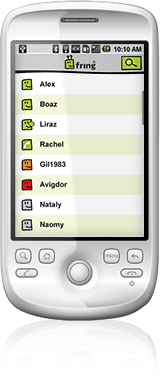
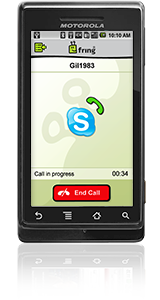
After weeks of speculation, rumors and alpha testing with our much-appreciated early access group, we are finally out with the 1st ever fring for Android!
Android device users can now get onto fring (we know you’re been missing us since some of you recently switched to Android devices ) with (the first) free VoIP calls over Skype, MSN and GoogleTalk and via hundreds of SIP providers. As always you can see real-time presence and live chat with your ICQ, Yahoo! And AIM buddies too. You can also use Twitter there, as part of your integrated contact list.
fring on android works over 3G, GPRS or Wi-Fi internet connection.
What do you need to do to get your hands on this brand-new version?
You have 2 simple options for getting fring onto your Android device:
1. Get it directly from the Android Market:
• Start the Market application on your phone
• Search for fring and install
2. Get it from fring’s WAP site:
• On your Android phone, go to Settings > Applications and check the box to allow ’unknown sources’
• Point your phone browser to m.fring.com and download
A big thank you to our early access group for your invaluable feedback over the past few weeks!
Welcome to the big, happy, free fring family fringdroid-ers!
Known Issues (Will be fixed in the next version):
- GSM contacts do not appear in fring’s buddy list on the Motorola DROID device
- Call disconnection tone may be heard a few times when terminating a call
- SIP and SkypeOut calls are not yet available on the Motorola DROID device
The fringTEAM


