


Product admin on 29 Mar 2011 02:55 pm
Product Team update: Behind the scenes of the latest fring for iPhone
Hi fringsters,
I’m back again with some more ‘behind the scenes’ product insights.
Following our latest iPhone release, the one with the cool camera flip and the iTunes fringOut credit purchase, we saw that some of you were asking “Where did all my friends go? I used to have a full buddy list, but now it’s nearly empty and I can’t even re-add my missing buddies”.
Well, one of the changes we’ve made in this version was displaying only online buddies. We’ve figured that you simply can’t video call friends who are currently offline, or call your contacts using fringOut without having any fringOut credit. Therefore, by displaying only online buddies, you get a shorter, more relevant, and infinitely more interactive buddy list. Of course, all the offline buddies are still there, and will be displayed again when they come back online. Address book contacts are displayed as soon as you’ll purchase fringOut credit.
Basically we moved from the crowded —> to the easy on the eyes
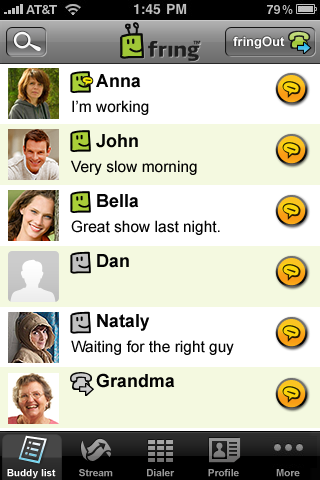
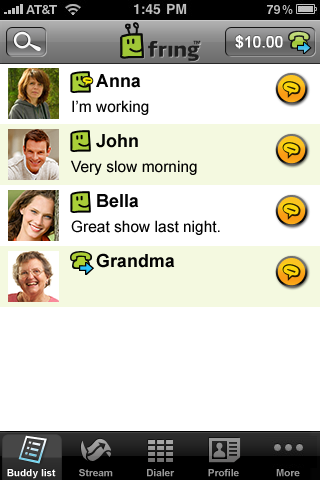
However, for those of you who still wish to see all the buddies, go to your device’s settings, click the line with the fring icon, change the setting named “Show offline buddies” to “ON”, and restart fring. We know it’s outside the application, but that’s the way things are done in the iPhone world. To view all the address book contacts use the “Manage add-ons” option in the “More” tab of the application.
As always, feel free to comment to help us make an even better fring for you. We hope you’ll enjoy our new version – let us know what you think!
Cheers,
Gilad
on 29 Mar 2011 at 7:10 pm 1.mohamed hassan said …
Fring hasnot monthely bunddle discounts sorry for it
[Reply]
on 10 Apr 2011 at 9:41 am 2.Farhan said …
I don’t now. Whaat i do?
[Reply]
on 15 Apr 2011 at 8:36 pm 3.Sulingo said …
What abt us folks who ‘only’ hv Nokia/Symbian phones? When can we get the Flip Camera Feature upgrade????? I love using Fring and like to share my surroundings with my buddies - it’s pretty restrictive without the added feature.
[Reply]
on 22 Apr 2011 at 4:51 pm 4.Mahendra said …
The version still gets stuck or slows down a lot. Having to wait up to 10seconds before being able to type again. Happened to me a few times already. Kindly fix it
[Reply]
on 27 Apr 2011 at 11:33 pm 5.Riotz said …
Funny how there is no Fring Test Call on those screenshot. I dont see any way yo remove the annoying Fring Test Call from my list…
[Reply]
on 23 May 2011 at 3:18 pm 6.sumit said …
my friend is online but i cant find her in my buddy list
[Reply]
Tom Reply:
May 24th, 2011 at 1:25 pm
Yes, we are aware of that and working to fix it.
[Reply]
on 23 Jun 2011 at 1:23 am 7.Mike said …
Is anyone having trouble with audio there is no loud speaker icon on my app audio very low
[Reply]
on 22 Jul 2011 at 6:39 pm 8.Aj said …
Fring has always been my fav app on iPhone …
Have been using it since it first came out and congrats it has gone a long way and had a lot of changes for it’s betterment.
My first deception came when skype was thrown out … But still it has a lot to offer till today n so I continue to use it.
Could u pls help me to know how to use my contacts in fring to be able to call my family threw Voip … It worked till a few weeks ago … Now I don’t seem to find my phone contacts on my buddy list to dail them.
[Reply]