United Kingdom

Archive for the ‘using fring’ Category

Ready… set… go mobile!

Tuesday, July 1st, 2008

The first fringAdd-ons now live including Facebook, Gmail notifier, Orkut and more!

Facebook, Gmail notifier, Orkut, vTap and Yandex.mail notifier are the first new mobile applications ready for you via fring! Thanks to our recently released fringAPI, developers have started creating all kinds of mobile games, tools, services and apps all available via the fring catalog of fringAdd-ons.

To get on with fringAdd-ons, restart fring –> click Options –> settings– > manage add-ons select the ones you want and your favorite apps will be always-on and always mobile via fring
(fring Add-ons are available for fring on Sony Ericsson -UIQ, Windows Mobile and Nokia Symbian 9 devices, Important! you’ll need fring’s latest version)
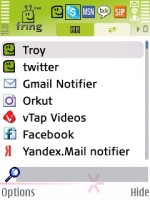
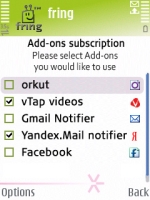
main_screen_add-ons_fixed_small.jpg channels-subscriptions_small.jpg

So what internet apps have you been dreaming about taking mobile? Dream no more – just find a developer to mobilize your favorite web apps for us all via fring!

As always, let us know what you think and how we can further help you go mobile!

Have fun!
The fringTEAM

fring introduces Wi-Fi WISPr

Tuesday, October 16th, 2007

With WISPr, fringsters can now seamlessly roam within Wi-Fi networks, even in uncharted Wi-Fi territory!

Since we launched auto-roaming between 3G and Wi-Fi back in September, we’ve been busy whispering between ourselves and working on new ways to further smooth the transition for automatic roaming without user involvement. With WISPr, fring now recognizes any Wi-Fi network you have logged into before, even if you’ve never been to that particular hotspot. For instance, if you are a Cloud member and have first logged into fring at a café in Piccadilly Circus, fring will automatically recognize and log you into all other Cloud networks anywhere in the world as soon as you enter their hotspot zones. This can happen automatically without any manual involvement on your part, which is convenient and particularly valuable if you have an unlimited usage plan with a Wi-Fi provider.

WISPr means you automatically have the best call quality and biggest cost savings over Wi-Fi whenever in range of any Wi-Fi network you have previously logged into. Just like the current fring auto-roaming client, automatic handover between specific Wi-Fi hotspots within a recognized Wi-Fi network is activated in idle mode and not during a call.

Right now fring only WISPs on Symbian 9.1 phones but we’ll keep the rest of you posted on developments! See our original post for more info on fring auto-roaming or how to activate it.

To activate fring auto-roaming or WISPr (if you are already auto-roaming), just go to options > settings > connection manager > search for WLAN. Choose a Wi-Fi network and enter your credentials.

So now, simply enter the zone and you’re online!

Please keep us posted on your WISPr experiance!

Wi-Fi coming to McDonald’s in the UK

Wednesday, October 10th, 2007

Well, it looks like someone at McDonald’s has been reading our blog!!

Days after we posted about the joys of Wi-Fi at McDonald’s in Belgium and Israel, ZDNet.co.uk reported that Wi-Fi will soon be available in its 1,200 UK restaurants. This is courtesy of a partnership with our good friends at The Cloud.

Maccy D’s reckon if you pay to log on to Wi-Fi for an hour per week their Wi-Fi will save you as much as £260 per year – we like cost savings like that at fring!

Does anyone have any requests for the McDonald’s guy/gal reading our blog?

My request is free burgers for everyone with a fring-enabled phone…reckon that’s a bit too hopeful?!

Be a fringing Twitter!

Monday, October 1st, 2007

twitter_logo.jpg

One of the great things you can use fring for is Twitter. Twitter is a global conversation of people sending in their short text messages of what they are doing right at that moment. Twitter is a great way to keep up to date with what your friends, family and business associates are doing wherever they may be on the globe.

A lot of business people also use Twitter in their work environments especially those that are spread over multi sites or have international offices. The instant access to the Twitter streams, whether on your PC or your via your mobile, means you are tapped into the source wherever you are and when ever you want to. As one of my friends put it, “you are mainlined into the world’s thoughts”.

The great thing about using fring is that you can jump into this tantalising tittering of Twitters and be part of the communication revolution real time.

So people who use Twitter are finding out that it can be all things to all people as it is a conversation, a bulletin board, a blog, a dating service, a news source, a friend finder………

Want in? :-) Then head over to Twitter at http://www.twitter.com/ and sign up for an account then plug your sign-in details into fring.

Here’s a video we put together showing how it works….
http://www.youtube.com/v/WdQicVM2CfU

Twitter on fring can be a bit infectious, so consider yourself warned! :-)

User question about using fring with mobile data

Friday, September 21st, 2007

Pawl has emailed us a question about the folowing…

I found this great software after long-time looking for such thing. Do I have to buy any internet plan add-on or 3G/GPRS data packet-transfer add-on to use fring? I installed fring on my handset and it is working great using my home W-LAN, but any time I try to connect thru 3 network it fails.

Pawl, thanks for your email and yes you do have to update your mobile plan to include mobile data (GPRS/Mobile broadband).

I would go to 3 UK’s website here 3 UK Mobile Broadband plans and check out the different data plans they have available.

Thanks for using fring Pawl! :-)