Category ArchiveVideo
News & Symbian & Video admin on 01 Mar 2010
NOW, Free Video Calls for Nokia Symbian 9.3 devices!
A few weeks ago we announced the release of the world’s 1st mobile internet video calls on Symbian S60 and iPhone/iPod touch devices.
Thanks to overwhelming user demand and video call usage, we started rolling out video call support for more devices over the last few weeks.
Now more good news! Today it’s Nokia E72 & E75 (and all other Symbian 9.3) users who can also video call with their friends on fring and Skype for free!
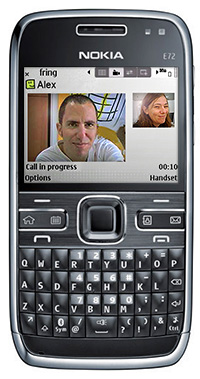
All Nokia Symbian users, we’ve got news for you too! The newest version contains some quality improvements, bug fixes and better connectivity in some specific scenarios - so we highly recommend that you get the latest and greatest version, as well.
How do you get it? Simply got to fring’s download page and get it today!
We have some more news coming for you in the next few weeks so stay tuned.
The fringTEAM
News & Video admin on 24 Nov 2009
World’s first fring and Skype mobile video calls over internet!
Only a week after releasing our Android version, we’re very excited to announce the healthy arrival of….the world’s first mobile video calls over internet! (with fring and Skype video calls  )
)
Now for the first time ever fringsters can make and receive internet video calls from mobile devices (for free!), picking up your fring and Skype video calls from the road, and seeing the person you’re talking to from your mobile phone.
fring video is currently supported on Nokia touch (such as X6, N97 mini,N97, 5800), N95, N95 8G and N82 devices.
Coming soon on other popular platforms so stay tuned!
WARNING: When NOT to fring video:
- When picking up a call from the toilet
- While cheating on your boyfriend
- While at the beach after you called in sick this morning
Download the new fring version with video here and…ready – set - action!
The fringTEAM
How To & Video & friends of fring & web tools admin on 21 Jul 2009
How to invite friends from the fring website [friends finder week]
The new fring “friends finder” section on the fring website gives you many ways to invite new friends to join you on fring.
Invite by email: just enter your own & your friend’s email address to the form. You can enter multiple addresses by separating them with a comma. This is the email your friends will get.
Find on other networks: you can invite your hotmail, gmail. Yahoo mail & AOL mail friends to fring. It is sweet and simple; just enter your email service credentials onto the form, make sure you are logged into fring with your fring credentials, and click “Next”.
First, fring will locate your email friends that are fringsters. Next, you can easily invite them to become your fring buddies (use the “add as friends” button)
The second step is to send an email invitation to all your email friends that are not yet fringsters. Just use the “send email invitation” button. This is the email you will send them.
Note: All information is submitted securely & fring does not store any of this information. Your credentials are safe and fring will never use them again without your specific approval.
Friends finder week & Video & iPhone/iPod admin on 19 Jul 2009
How to add friends on iPhone/iPod touch [friends finder week]
So you have fring on your iPhone/ iPod touch, how very lucky you are!
The only thing left is to have all your friends on fring on as well.
The way to do that is short, sweet & simple:
Go to “More” > “Add new buddy”
If you know your friend’s fring User ID choose “By fring User ID”
Enter your friend’s fring User ID, fring will search the fring directory and when found, will let you know. Your friend needs to approve the request and Walla! You are now both fring friends.

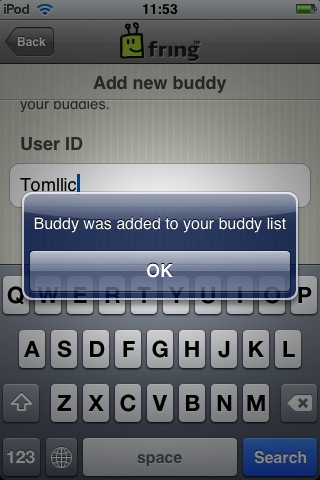
If you want to add friends from your phone address book choose “By phone contact”. Select a friend from you phone address book, next fring will search for your friend in the fring directory.
In case your friends still don’t have fring, drop them a word.
Keep in mind, the more fring friends, the merrier!
Happy fringing
Video admin on 30 Jun 2009
“fring is no suck”- Ivekt from Moldova
We just got this video from one of our users and we could not stop laughing. So, we thought we might share it with you.
His name is Ivekt and he’s from Moldova. He’s got a (very) funny channel on Youtube, dedicated to domestic hints and tricks.
So, check out the video he shot about fring and the rest of his videos - I think he could easily be the next YouTube star… remember where you saw him first.
Enjoy.
News & Video admin on 24 Jun 2009
fring supports new iPhone 3.0 and Nokia N97 as they hit the shelves!
While iPhone and Nokia have been busy getting their iPhone 3.0 software and Nokia N97 ready for the shelves, we’ve been busy making sure fring supports them as they hit the market so you get the biggest bang for your buck from day one!
fring now supports Apple’s latest iPhone 3.0 software update
Following Apple’s last week release of the iPhone 3.0 software update, we’re happy to announce that fring now supports the brand new iPhone 3.0 firmware , including the new iPhone 3Gs. What does it require of you!? Absolutely nothing! The version is already on your phone, ready for you to enjoy, with Apple’s latest and bestest yet.
For these of you who don’t have fring’s latest iPhone version yet, get yours today!
The brand new Nokia N97 is avaialble in stores now
Originally announced last December, Nokia’s just announced the official retail release of its much- anticipated N97 device, available in their flagship stores; fring is proud to support this cool, new device with its most recent and most social version to date- the 3.40 version.
The Nokia N97 flagship phone boasts a large 640×360 sliding/angling touch screen display, slide-out QWERTY keyboard, Symbian S60 5th Edition, 5 megapixel camera, and 32GB of internal memory.
Those of you who are lucky enough to get your hands on this new device are welcome to download fring today!
We are looking forward to hearing your feedback on the fring experience on the slick, new N97.
The fringTEAM
Around the fring & Video admin on 08 Jan 2008
A note to our reader Bill
Dear Bill,
If you’re still looking for a job… we have a few open positions that might suite your needs and experience
Uncategorized & Video admin on 04 Jan 2008


