United Kingdom
18 November 2008
Feed on
March 4th, 2008


So, how do you give fringing freedom to as many fringsters as possible?

This is a question we’re always asking ourselves at fring, and one of the answers we’ve just come up with is the fring Affiliate Program (just rolls off the tongue, huh? :-) It basically gives other players such as SIP, Broadband VoIP ISPs & WiFi providers, a way to offer their services easily to mobile phone users. And here’s the cool part - all the fiddly bits such as user name and password, login details, account settings etc are pre-configured, so it’s hassle free set-up for the user and the account is ready to go mobile immediately after downloading fring.

It’s another example of fring’s openness and freedom. Anyone can come and play and offer fring’s freedom of choice to their customers. Very cool we hope you’ll agree!

If you’re clever enough to have your own SIP, Broadband VoIP ISP or WiFi accounts, go and see if your provider has signed up to fring – if not, send them our way – it’s free of charge for you and for them! ;-)
If you want to know more see our press release.
In order to sign up as a fring affiliate, please use our partner page.

March 4th, 2008


We’ve been hard at work at fring trying to make the fringME! web widget even better and available to even more fringsters. So, our clever developer guys have just come up with a new version for you to put onto web pages that support Flash like MySpace among others.

We’re also now supporting UIQ handsets as well as Symbian with the cool web-to-mobile chat feature, so you can be contacted by all of your online buddies wherever and whenever you want (Find Me not yet available for UIQ handsets).
Stay connected with your internet communities,
have them communicate with you directly from your favorite internet pages via fring.

widgetexample1.png widgetexample2.png
fringME! enables your entire community of online buddies to reach and find you on your fring-enabled mobile from anywhere on the web, whether they’re fringsters or not. Visitors to any of your own web pages, blogs and pretty much anywhere you have a bit of internet of your own will be able to see instantly whether you’re online, offline, or busy in a call and also chat with you.

To start using fringME! you will need the latest version of fring.
Then simply visit the fringME! web page to choose a cool new fringME! widget design, then copy and paste a small bit of html code onto your chosen web pages, switch on and configure fringME! on your mobile handset, and away you go.
PLUS …(are you reading this sitting down?) if you’re a Symbian user (and one of those lucky b@#&%$ with a GPS equipped handset), your visitors can view your location in real time via Google Maps as well.

Important! (now stand up and pay attention) fring’s privacy settings on your handset require you to switch the fringME! location feature on or off (you know, like ‘Opt in and out’… perfect for those occasions when you don’t want to be found!)
The features included in the fringME! widget will be expanding, with more very cool stuff coming soon.

February 26th, 2008

Yo, Yo, Yo Sony Ericsson people!

We are happy to release a brand new version of the fring client for your devices, packed with the following features

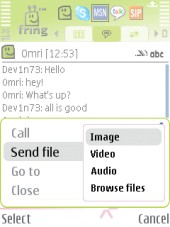
1. file transfer – swap files with any other fringster or PC buddy (currently MSN only, but more to come shortly)

2. chat improvements – you spoke, we listened and using your ideas and suggestions we’ve created new fring chat feature, making the experience even closer to your PC chat sessions - give it a try - you won’t be sorry.

3. fring is now available in English, French, Spanish, German, Chinese, Italian, Russian – what can I say ? You asked for it, we translated it ;-)

BTW: fring will automatically install the default language based on the handset language; you can always go to the More –> settings menu to change language

4. privacy setting – your privacy is important to us! We’ve enhanced your privacy settings (you can now choose to show/hide your signature on PC IM clients as well as control mood message and switch them on/off )

5. fringtons & vibrate: bring on the tunes. Want to change fringtones ? Go to our fringtones page to check out and download free ringtones to your handset (or simply choose one already loaded into the music library on your device)

Have fun and please tell us what you think.

February 6th, 2008

We’ve been filing your feedback and waited eagerly for the day to let you know that we’ve unlocked one big iron gate…. You can now swap music, pictures, video clips and other files via fring over WiFi or 3G from mobile to mobile and mobile to PC! Its quick, reliable and of course free! No need for MMS, cable, Bluetooth or Infrared.

Please notice- file transfer is currently available from fring to fring, fring to MSN and vice versa, with more services to be included soon! Feedback on your mobile file sharing experiences is most appreciated!

And now onto otherwise earth shattering, but comparably ‘interesting’ updates…

Chat window 3.30

The new fring version 3.30 is also :
1. Multi-lingual – available in English, French, German, Spanish, Italian, Russian & Chinese. It automatically installs in your handset’s default language unless you choose another language from the settings menu. See your local language blog for more details.
2. Chat enriched – with display features & icons to let you know when your buddy is typing, improved navigation between concurrent chats & more…(Chat shortcut! - Pressing the joystick in when selecting a buddy in the main screen opens the chat tab)
3. Downloadable here - for Nokia S60 handsets for now. We’ll keep you posted when available for everyone else.

February 3rd, 2008

Avi Shechter, the CEO of fring has been invited to speak at the Mobile World Congress on the morning of Wednesday 13th February 2008, in Barcelona. The topic of his talk: “Mobile VoIP - friend not foe of the network operator.

Given the subject matter this promises to be a lively and thought provoking section of the show, and is sure to lend new perspectives and spark discussion, that will help drive the future of the mobile space.

Avi will also be sharing his vision for the next 12 months and beyond, with particular focus on how fring believes consumers will start to re-think the way they use their mobile devices.

As reported earlier, fring has also been invited by Nokia to join its forum Nokia stand, on the second level of the main Nokia stand in Hall 8 of the Mobile World Congress 2008. fring will be doing demonstrations from the stand for the duration of the show, including the unveiling of some new and very exciting features, some of which are genuine firsts for Mobile VoIP. We’ll also be explaining what fringing freedom really means to both consumers and potential partners.

The great thing is that anyone who wants to meet or interview Avi can do so at the show.

January 14th, 2008

Posted by: Simon Botes

Here’s a little good news for fringsters in the UK. T-Mobile has introduced a great new package allowing for free WiFi access when using a web’n'walk package.

T-Mobile has also collaborated with 3 to provide the most extensive 3G/HSDPA network in Europe. By the end of 2008 the collaboration hopes for complete population coverage.

“As the largest provider of public WiFi in the world, T-Mobile customers can also take advantage of 39,000 WiFi HotSpots across the globe.” Intomobile

Fringsters what are you waiting for, take advantage of this great new free WiFi offer today.

January 3rd, 2008

A few days ago we added Yahoo!™ & AOL’s AIM® to our ever growing network of supported IM services.

The welcomed new additions to the fring family where only supported by Symbian and UIQ handsets, which didn’t quite feel right, so our tech gurus in the true spirit of spreading freedom spent this holiday season working around the clock to support these services on Windows Mobile devices. Well done guys, the hard work is paying off!

Without further ado take your Windows Mobile devices log into fring, then click Options > Settings > configure Services > Scroll down and select the service you would like to add and away you go.

fringsters keep watching this slot for exciting new features coming very soon!

December 26th, 2007

fringsters the time has come for you to decide who deserves the title as best mobile start up for the year 2007. fring has been nominated in the Best mobile start-up category and we now need your vote.

“The 2007 Crunchies is the first annual competition and award ceremony to recognize and celebrate the most compelling startups, internet and technology innovations of the year.

The Crunchies is a collaboration project between GigaOm, Read/WriteWeb, VentureBeat and TechCrunch.” The Crunchies. What makes this award different from the rest is that the internet community (Thats YOU!) is invited to choose who wins.

May the best fring win!

Voting ends Thursday, January 10th 2008, let your voice be heard Vote for fring today!

VOTE 4 fring

December 26th, 2007

In response to demand from our users, we just added Yahoo!™ and AOL’s AIM® instant messengers to our growing world of online communities, joining Skype, Google Talk, MSN, ICQ, and Twitter to provide fringsters with the most comprehensive way of staying connected with all of their online buddies.

Listen up all those of you that have a Yahoo! or AIM account and a fring-enabled handset (dah…) ‘cos now you’ll be able to take all of your buddies mobile and benefit from fring’s IM-style chat and live presence features, enabling you to bring your IM and mobile phone contacts into one easy-to-use list on your handset. You’ll be able see whether they’re on, offline or away and enjoy rich chat sessions from your mobile or whenever you’re away from your PC.

NOTE: Yahoo! & AIM are currently available for Symbian and UIQ handsets; voice calls are not yet enabled.

Geek Alert: You don’t need to upgrade your fring. We’ve enabled it on our servers, so all you need to do is to go to settings> services and add your service user name and password.

fringing freedom is at the heart of what fring is all about, adding Yahoo! & AIM is a good example of that. It means breaking down barriers of communication between the mobile and internet worlds, and giving you the choice to make connections regardless of network, platform or device.

fringsters stay connected this holiday season… more cool things heading your way soon!

Happy holidays from fring

December 26th, 2007

Two months ago we brought you WISPr for Symbian handsets.

We promised that WISPr support was soon to follow for UIQ handsets and for all those waiting for support, wait no more - WISPr for UIQ has arrived!!

For those of you who missed the last post: With WISPr, fringsters can seamlessly roam within Wi-Fi networks, even in uncharted Wi-Fi territory!

The other great thing about WISPr is that fring can now be used to enable smoother and quicker mobile web browsing, as your login credentials, once previously entered, will be stored inside your browser. Simply start fring, enter a Wi-Fi zone, launch your mobile browser, and you’re online!

To activate fring auto-roaming or WISPr (if you are already auto-roaming), just go to options –> settings –> connection manager –> search for WLAN. Choose a Wi-Fi network and enter your credentials.

fring now auto-roams on supported Symbian 9.1 & 9.2 and UIQ devices so download and upgrade to this auto-roaming version now.

Along with this update comes the support of a few extra handsets.
fring welcomes Nokia N81, 82 and N95 8GB to the fring party.

Symbian 9.1 & 9.2 users will also be happy to know that fring has been working hard to iron out bugs and they have now released V3.24.16, Get it while its hot!

N81,82 and N95

Page 2 of 7«12345»...Last »