


Feature Highlight admin on 14 Jun 2009 10:00 am
Feature highlight – merging contacts on 3.40
It seems that you guys really like the new 3.40 version - that’s great!
Some of you have asked about the manual contact merging, so here’s a little explanation for you:
How does it work?
I have a friend called Tom. Now, Tom is such a good friend of mine that I’ve added him as a friend on MSN, Skype and fring.
On the new 3.40 version I can merge Tom’s entity from these services into one contact on my fring buddy list. Sounds convenient, isn’t it?
How do I do that?
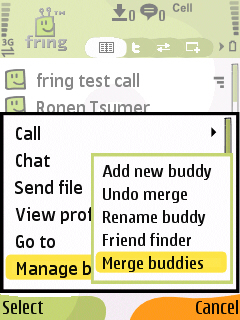
Highlight your buddy on the buddy list and choose Options -> Manage buddies -> Merge buddies.
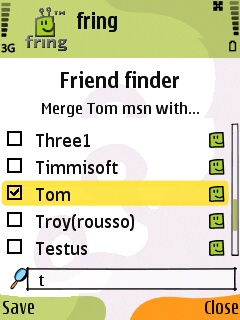
2. Check the box near the contact or the contacts you would like to merge with your buddy and click Save.
This process can also be done directly from my buddy’s profile screen by highlighting your buddy, choosing Options -> View Profile -> Options -> Merge buddy.
Cool. The first step is done.
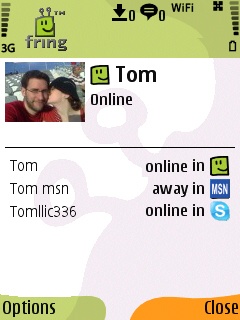
How do you call/chat this contact?
I see that Tom is now online and I wish to make a call to him. I choose him from the contact list and hit the green button. I’ll choose the service I wish to use and click the joystick.
To start a chat with Tom I can click on ‘options‘ -> ‘Chat‘ and start typing my message. Now, the first message will be broadcasted to all the services that Tom is currently available on. The conversation will continue on whatever service Tom will choose to reply on. Simple.
As always, we’d love to hear your thoughts and comments about this feature and about the brand new 3.40.
on 16 Jun 2009 at 5:55 pm 1.ingo said …
if it only would work ! it keeps crashing all the time…there has never been a new version of fring with so many bugs and so unstable…downgrade to 3.37 please !
[Reply]
omri Reply:
June 18th, 2009 at 11:58 am
We are aware of some crashed on 3.40 and working to release a fixed version in the next few days.
Stay tuned.
[Reply]
on 19 Jun 2009 at 2:09 pm 2.K said …
Hi, when do you think an update to the iphone app can be released with these new features?
Also, are you planning to make use of the new push notification?
Thanks!
K
[Reply]
on 26 Jun 2009 at 12:38 pm 3.Giulio said …
Yes, we want to know when this GREAT feature will be available for iPhone Fring app.
Beejive still implemented it in its latest release (calling it “Meta contacts”).
This would definitely make Fring the best Multiple IM app for iPhone!
Thanks in advance for your answer,
Giulio
[Reply]
on 22 Sep 2009 at 11:06 pm 4.Dave said …
I think I prefer Palringo, when I get a message there is a notification in windows mobile, the only thing I like about fring is that the fonts are bigger. But in neither program can you adjust them.
[Reply]
on 20 Nov 2009 at 4:34 pm 5.Jason said …
And now the obligatory, when will we see it on Droid question
[Reply]
on 24 Nov 2009 at 3:38 pm 6.Joe Citizen said …
So… As asked earlier, when/will this feature be making it to iPhone? Cheers.
[Reply]
on 04 Dec 2010 at 11:52 pm 7.andreas said …
apparently not
pretty useless without it
[Reply]
on 24 Mar 2011 at 11:43 pm 8.Eduardo Marques said …
how to undo merge? I acidentaly do it and what a problem!
[Reply]
Tom Reply:
March 25th, 2011 at 1:57 pm
this info is available on our user guide, but I can assist here if you want. Which handset type are you using ?
[Reply]
on 09 May 2011 at 10:42 am 9.Feena said …
I hv accidentally merge two contacts together, and now I cannot undo it . What can I do? I m using fring on iPhone app and it seems that this app is not user-friendly to me
[Reply]
Tom Reply:
May 9th, 2011 at 11:36 am
Go to the merged profile and slide your finger to the left over one of the contacts.
If you are still experiencing issues, please contact our support team.
[Reply]
on 24 May 2011 at 12:45 pm 10.Flora said …
How do I UNDO OR UNMERGE the buddies which I have mistakenly MERGED (2/3 BUDDIES) MY iphone is 4G model…please advise
[Reply]
Tom Reply:
May 24th, 2011 at 1:23 pm
Go to the merged contact’s profile and slide your finger to the left over the merged entities.
[Reply]