


How To & iPhone/iPod admin on 06 Apr 2009 05:30 pm
Feature highlight: Always-on
Hi guys
As you know, we released the new iPhone version a few days ago and the feedback so far has been great!
Several people have asked us about their always-on presence option even when fring is turned off, so here is a communal explanation for y’all:
The new Always-On feature keeps you logged into fring even when the fring application is closed on your iPhone/iPod touch.
It works like this:
To activate the Always-On add-on, click on ‘More‘ -> Add-ons -> Always on.
You’ll get the following screen

Enter the email address you have configured into your iPhone and click ‘Send‘
Within a few seconds you should get an activation email. Open the email on your iPhone and click the link to activate the service.
Once you’ve clicked the link and activated the service you can click the home button and fring will keep you logged in. This of course works with all the services you use on fring ( fring, Skype, MSN, Google talk, ICQ, Yahoo etc)
How do I get the notifications?
To get the notifications in real time you should have your email address configured to be “pushed” to your iPhone/iPod. Once you got that done, you’ll get an email whenever someone’s trying to call/chat you. Just open the mail and click the link -> fring will open up on your phone and display the message.
If you don’t click the link within 5 minutes - we will log you off from the Always-on service and won’t send you more notifications until you log in again to fring (we don’t like spam…)
I’ve registered to the add-on, Now I want to go offline, How do I do that?
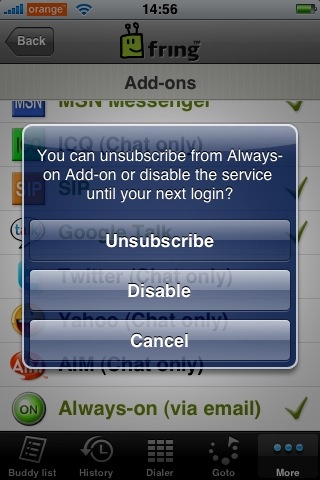
Open fring, click on ‘More‘ -> Add-ons -> Always-on.
You’ll get the above pop up. If you click on ‘Disable’ we will log you off from the service until the next time you open fring. Or, you can unsubscribe from the add-on completely (but why would you want to do that ! ?  )
)
A few things:
1. Currently this feature is available for UK and US users only but no worries… we will gradually make it available to all countries.
2. Once you’ve subscribed to this service we will keep you online for between 2-4 hours. This time frame may vary based on country as we are still fine-tuning this process in order to optimize your experience.
3. As we mentioned in the initial blog post, this feature will eventually use Apple’s 3.0 firmware notification SDK, once it’s made publicly.
We are hoping to add more countries in the next few weeks so stay tuned for more news.
As always, your comments and feedback is much appreciated!
The fringTEAM
on 06 Apr 2009 at 5:56 pm 1.fring update their iPhone/iPod Touch app | UK Gadgeteer Website said …
[...] Update: fring have also provided more information their “always-on” system here. [...]
on 07 Apr 2009 at 12:52 am 2.antonioj said …
i´m running 3.0 beta 2…do you need beta testers for push notification version???
[Reply]
on 07 Apr 2009 at 7:43 am 3.Fring Version 1.1.0.7 Released - Always-On Feature Added | iPhoneIndiaBlog.com said …
[...] - Fring Blog] Tags: Fring, Fring [...]
on 17 Apr 2009 at 3:41 pm 4.Peteo said …
Only 2-4 hours? make this 24 hours, or never log me off. and the 5 minute thing should be an option, you should keep me logged in until I tell you to log me out. Do not auto log me off.
I’m also on 3.0 beta 3 so if you need a push tester let me know
Thanks,
Pete
[Reply]
on 14 May 2009 at 3:50 am 5.G said …
Hey Fringas,
In the original post it said this will be available in more countries in the new few weeks. How are we going with this? Specifically Australia
G
[Reply]
omri Reply:
May 14th, 2009 at 1:04 pm
Hi,
Australia is already supported.
Give it a try now.
[Reply]
G Reply:
June 18th, 2009 at 6:09 am
I may have this wrong, but it would seem that fring would keep me connected and when I would get an email when I get a message. I can’t seem to get this to work… I am in Australia, but when I get a message I don’t get an email. If I look at the fring settings the disable button is visible, so I assume that it is turned on.
Still working under 3.0 though, good work
G
[Reply]
on 15 Jun 2009 at 2:06 pm 6.vasu said …
could some 1 help me i am unable to see the voice chat option in my sony k800i……….
plz………..
what shall i do to get that option……….
[Reply]
omri Reply:
June 15th, 2009 at 2:13 pm
The minifring version does not support voice calls - only chat.
[Reply]
on 02 Jul 2009 at 10:10 pm 7.Liberty For ALL! said …
So where’s the 3.0 Push Notification support?
[Reply]
on 07 Jul 2009 at 5:42 am 8.Scott said …
I can’t find Allways on in the add on’s menu. Am I blind, where will I find it there?
[Reply]
on 07 Jul 2009 at 10:51 am 9.Indonesia » Blog Archive » Beberapa catatan soal fitur Always-on di iPhone said …
[...] Fring baru saja merilis versi baru buat iPhone beberapa hari lalu, dan umpan balik yang masuk sejauh ini cukup bagus. Beberapa orang pengguna menanyakan kepada kami mengenai opsi always-on ini khususnya ketika fring dimatikan, berikut penjelasan dari tim Fring: [...]
on 11 Jul 2009 at 5:15 pm 10.andy said …
always-on. but its not really is it. CRAP con
[Reply]
on 17 Jul 2009 at 9:43 pm 11.fring » New fring iPhone version with Push Notification said …
[...] If you’re using a prior firmware version (such as the 2.2) you can still use the ‘always on’ add on, released a few months [...]
on 17 Jul 2009 at 10:52 pm 12.fring mobile voip south africa » New fring iPhone version with Push Notification said …
[...] If you’re using a prior firmware version (such as the 2.2) you can still use the ‘always on’ add on, released a few months [...]
on 19 Jul 2009 at 10:13 am 13.fring mobile voip india » Blog Archive » New fring iPhone version with Push Notification said …
[...] If you’re using a prior firmware version (such as the 2.2) you can still use the ‘always on’ add on, released a few months [...]
on 20 Jul 2009 at 5:36 pm 14.fring New iPhone Push Notification Version is Live | SociableBlog.com : Social Media Blog said …
[...] firmware to iPhone OS 3.0. Users using prior firmware version (such as the 2.2) can still use the ‘always on’ add on, released a few months [...]
on 29 Jul 2009 at 10:51 am 15.Rajj said …
even after doing the steps above i couldn’t turn it always on, may be i need to resintall fring again. Thx for the tutorial
[Reply]
omri Reply:
July 29th, 2009 at 11:09 am
If your iPhone is jailbroken - push will not work on it.
[Reply]
on 25 Oct 2009 at 1:31 am 16.Mainak said …
10/22/2009 - Installed fring 2.0.0.4 on New iPhone 3gs. No always on option. Any comments?
[Reply]