


Feature Highlight admin on 23 Jul 2009 04:28 pm
Feature highlight: Push notification
So, you’ve all been very excited about the new ‘Push notification’ we released last week but since it’s a new feature on the iPhone 3.0 firmware some of you had a few questions about it. So let’s dive in and explain it a bit further:
Using the new Push Notification capability, you can now be notified when you receive a call or a chat when fring is not running.
Note: Push Notification is only available on firmware version 3.x or newer. If you are using an older firmware version, you can use the “Always-on” add-on.
Once you register to fring and run it for the first time, you will see this message on your screen:
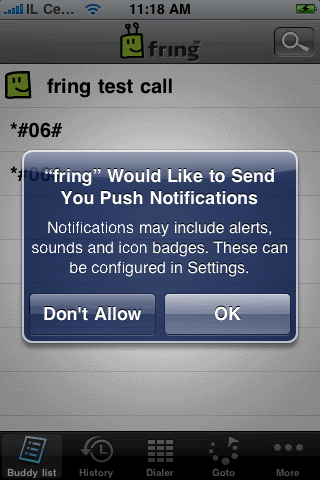
Choose OK and your contacts will continue seeing you as ‘online’ once you exit fring and will be able to send you chat messages and to call you.
Choosing Don’t Allow will dismiss this window and you will not get notifications.
Note: Once you exit fring, your contacts will see you online and you’ll be available for the next 6-8 hours. We’re still fine tuning this period based on your feedback.
When a contact will send you a chat message or try to call you while out of fring, you’ll receive these notifications:
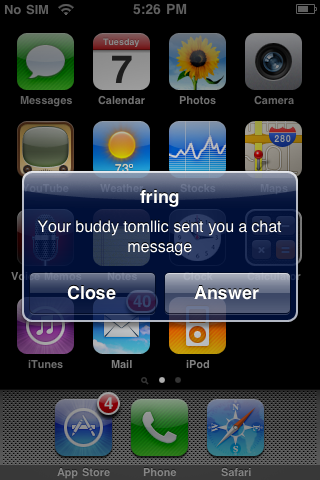
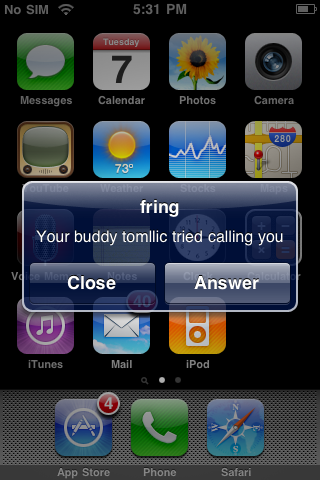
If you choose Answer, fring will launch and these windows will follow:
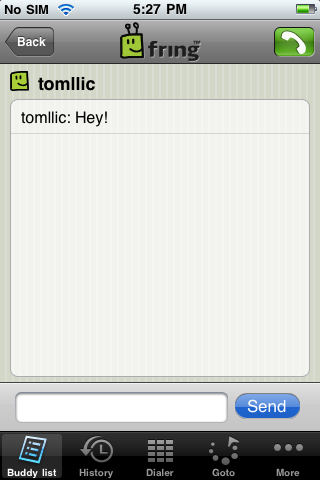
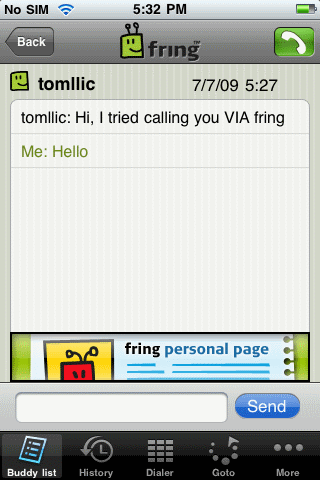
Note: if you choose Close, you will not be available any longer and your contacts will see you offline until the next time you launch fring.
Temporarily disabling Push Notification
If for some reason, you don’t want that your contacts to see you online when fring is not running, you can temporarily disable Push Notification. Just open fring, click on More -> Go Offline -> click Offline again. Quick & easy.
Well, seems that we covered most of this feature. If you have any questions feel free to post them here and we’ll be happy to answer them.
The fringTEAM
on 23 Jul 2009 at 4:37 pm 1.rpv said …
I don’t understand why if i don’t want to reply to certain person, let’s say mister X, and will click close it will put me offline.
In my opinion a better solution would set my status to Away, but can receive messages, and even though i would not reply to a first message still stay online for 6-8 hours. It would also be nice to have a reminder that would say you going to be offline in 15 minutes if you don’t relaunch Fring.
Sounds to me this feature is not fully funcitonal yet.
[Reply]
omri Reply:
July 23rd, 2009 at 4:47 pm
Thanks for your feedback.
As you know, this is a new feature and we’re here to listen to your feedbacks and think of how we improve it.
This should be considered for future versions.
[Reply]
rpv Reply:
July 23rd, 2009 at 4:52 pm
I hope my voice will be heard, you doing great job guys!
[Reply]
omri Reply:
July 23rd, 2009 at 4:53 pm
thx!
Darkker Reply:
July 23rd, 2009 at 5:29 pm
I support rpv here. I also like to stay online even though I don’t have time to answer right now. In my opinion the online status shouldn’t change even to away. Of course that could be configurable.
Also, I’d like to stay online much longer than 6-8 h. Several days or even longer and configurable by user. In addition to that, I’d like to receive a push notification when I’m about to go offline and maybe even an option to select “stay online”/”open fring and continue staying online”.
While I’m now giving feedback I’d like to see facebook chat also.
Great app anyway!
[Reply]
rck Reply:
February 1st, 2010 at 7:16 pm
I agree with rpv & Darkker here.
I would like to get the notifications but not have to actually launch the application each time I get a message. (To this end including the first 100 chars of the message would also be nice) I found this page when searching Google for the problem (I thought this behavior was a bug). Could this at least be something in “Settings”? I’d also like to have a longer timeout than 8 hours, a week seems friendlier.
Andy Reply:
October 8th, 2009 at 3:42 pm
I agree with rpv. It’s silly to assume you want to go offline if the “close” button is selected. The “close” button should only do what it says on the tin and close the notification box. Keep it simple.
To go offline is also a really silly “feature”. Why on earth have you implemented you app this way?? It just makes no sense and nobody would know about this unless they read this blog. I bet more than half of your users don’t even come to this blog. Again, keep it simple, go offline when the user says so, keep your app transparent.
Darkker said facebook chat, I’d love to see that too. And a keypad like in the Skype iPhone app so I can switch between hands-free and normal mode. Make it like the iPhone!!! After all, fring is a phone app.
The reason why I’m commenting is because I believe in fring, but the silly mistakes and assumptions within fring the company has to stop!
Hoping for improvements in the next release (yes I have latest from a few days ago).
Oh and one more thing, I tried to turn off notification only from twitter but was still receving twitter notifications. Is this a known bug?
Andy
[Reply]
omri Reply:
October 11th, 2009 at 10:39 am
Hi Andy,
Thanks for your feedback.
I’m not sure I understand why the “go offline” is a silly feature? Do you want to keep receiving notifications when you go to sleep? I don’t think so.
If you want to stay online just keep responding to the alerts you get or open fring.
We’ll have to check the problem with twitter… that’s strange.
[Reply]
on 23 Jul 2009 at 4:38 pm 2.John Warlow said …
Does this work for all subscriptions (Skype, MSN etc) or just fring?
[Reply]
omri Reply:
July 23rd, 2009 at 4:45 pm
Yes, it works for all services: Skype, fring, MSN, Google Talk etc
[Reply]
on 23 Jul 2009 at 5:08 pm 3.abap said …
Would it be possible to add on the popup message the name of application/protocol the message arrived from?
For example:
“Your buddy omri sent you a chat message (MSN)”.
Also, I see the buddy icons on my Buddy List still do not reflect their specific relevance.
Is it too complicated to use a different buddy icon to show the app it is related to (MSN, Skype, GTalk, fring, etc…)?
I believe these are a must in a multi-protocol client.
BTW, the Push Notifications work great in general, except of the big message-rerouting issue on the jailbroken devices due to the bad implementation of the PushFix patch.
Thanks.
[Reply]
rpv Reply:
July 23rd, 2009 at 5:44 pm
I actually saw one bug, i think when you get a skype message you unlock your iphone and it takes you directly to Fring (although it i quit it) and doesn’t give an option to read/close
[Reply]
on 23 Jul 2009 at 6:19 pm 4.Ethan Doh said …
Bug with Push Notification: After I get the notification, I click answer but I loose that message came as Push Notification so I get blank message window until he/she sends another message. This happened with MSN and Twitter. I didn’t test other IM services.
[Reply]
on 23 Jul 2009 at 8:51 pm 5.Sri said …
Will push notification work for SIP incoming calls? When Fring is not working I get no notifications. (GoogleVoice->Gizmo5->FRING). Of course when Fring is running I do hear the phone ring and answer the calls.
[Reply]
on 23 Jul 2009 at 9:18 pm 6.Neal said …
Let it keep me online for ever please! Or at least 24 hours! Otherwise I have to set a calender reminder to tell me me to open Fring every 6 hours!
Thanks for the push update though!
[Reply]
Cramey Reply:
August 7th, 2009 at 5:34 pm
LOVE the app!
If we cannot set our own push-online-time period then 6 hours is the maximum I would even consider. I’m a New Yorker & I don’t want my friends to see me online when I’m underground riding the subway. If I had choice I would probably do 1-2 hours on the average day.
Also please add a Jabber add-on.
[Reply]
on 24 Jul 2009 at 1:19 am 7.Ken said …
I’m excited about the push feature and so happy the Fring team has ‘pushed’ this out so quickly so we can begin to give feedback.
The best improvements I can imagine right now would look like:
* the ability to configure when push-polling for online status will expire, a two-week option would be great
* Buddy icons that are either service-specific or indicative of whether voice is possible
* improve push notification for incoming voice calls. currently tapping ‘answer’ after missing the call opens a blank chat window with no sender/title
* in-app notification if an add-on fails to authenticate with cached credential (if I changed my password elsewhere and forgot to update Fring)
[Reply]
on 24 Jul 2009 at 2:55 am 8.Darren said …
We all NEED facebook (multiple client) chat invincibility. Seriously!
Please sort it out on Fring. I’ll program it for you on Symbian and Windows for free if you like. contact me.
Best regards,
Darren.
Belfast.
[Reply]
omri Reply:
July 24th, 2009 at 9:55 am
Hey,
You know you can write an add-on for Symbian and Windows mobile, right?
Have a look here:
http://www.fringcall.com
[Reply]
on 24 Jul 2009 at 4:34 am 9.Ken said …
Oh yeah, and Facebook chat as an add-on would be revolutionary!
[Reply]
on 27 Jul 2009 at 4:34 am 10.Avalon said …
landscape mode on the iphone would be a nice touch
[Reply]
on 27 Jul 2009 at 5:35 pm 11.Caue Rego said …
As *rpv* pointed out, setting status to away would be better.
But I don’t see why it can stay up to 6-8h and not “until I say it so”. Just leave it away until I change it back (a.k.a launch fring and do something). It would also be nice to have an “X” button that would do same as the “offline”, in a more accessible place like, let’s say, everywhere.
The main issue, tho, is the battery consumption. It’s hard enough to tune up iPhone to last for 15h or so… with fring on, it seems it wouldn’t last 5h.
Anyway, great job guys, love fring and all job being done!
[Reply]
on 29 Jul 2009 at 5:21 pm 12.Andrew said …
When i used Google Voice to place a call to a landline and then connect that call to Fring on my iPhone - I get the popup that “someone tried to call” and I get taken to the Fring app, but the call is not answered by Fring. If Fring is open, I can answer the call.
Can you adjust push notification/fring to actually give time to accept the incoming call?
[Reply]
omri Reply:
July 30th, 2009 at 9:38 am
Currently it only notifies you about the call.
We’re still trying to optimize this feature based on your feedbacks.
[Reply]
on 29 Jul 2009 at 8:10 pm 13.Mike said …
I am still having a problem with with the push notification when getting a SIP call from Gizmo5. I get the push alert but when I go to connect, it always disconnects me. Anyone else having this problem?
[Reply]
on 30 Jul 2009 at 1:15 am 14.Deborah said …
Ok I get that you all like to be online all the time, but I actually would like to be able to be off line once I close off. Is it possible to make that the default through the setting? With the Itouch if I am not on wifi i am not responding to people and hense they are T’ed off that I show as online and I am really not.
I saw the option to put to offline from the more menu but this does not stay the next time I log in.
Cheers.
[Reply]
omri Reply:
July 30th, 2009 at 9:36 am
Sure, you can just disable the push notifications from the iPod’s main settings screen
[Reply]
Deborah Reply:
July 30th, 2009 at 5:38 pm
Is it the same thing with the iphone? I few of my contacts have the iphone as well.
Thanks.
[Reply]
Cramey Reply:
August 7th, 2009 at 5:50 pm
Deborah means off when there’s no data connection, not off when the app is closed. This is my issue with riding underground subways & appearing online to my friends. But I believe it’s an Apple limitation, I couldn’t imagine an installed iPhone app could detect when you lose your data connection & alert the push servers.
[Reply]
on 08 Aug 2009 at 8:19 pm 15.Soichiro said …
Hey there,
i’ve got a problem with push as well. I dont seem to get push notifications at all; furthermore, theres no “go offline” button in “more”…am I doing something wrong? Hardware is iPhone 3G, jailbroken and unlocked with Ultrasn0w.
[Reply]
on 09 Aug 2009 at 12:59 am 16.DK said …
This is a great app that makes my life a bit easier! However, push notification doesn’t work with Google Talk for some reason (it works perfectly with all other programs such as AIM and Skype). Is this issue an individual one or related to google talk in general? Thanks for your great work!
[Reply]
on 11 Aug 2009 at 9:50 am 17.Jessie said …
I need Skype, but the push function works properly for only 10 minutes. For sip, there’s no problem, I get push from Gizmo…but what I want is Skype.
Facebook…pls add facebook.
Also, is there a way to look at each contact’s info? I can see contact info/ friend is listed in my msn or google /etc in Nimbuzz. But they son’t push Skype, and they push for only 30 minutes. That’s why I’m considering Fring.
[Reply]
on 18 Aug 2009 at 5:14 am 18.hezahonker said …
I have same issues reported for push, says I have a tweet or tweets and then go to and blank page with nothing. Tweets update inconsistently even when running Fring. Push the same sometimes it works and sometimes not.
[Reply]
on 28 Aug 2009 at 9:52 pm 19.nithin said …
well I have downloaded this service and tried the push. But when I come out of the application and send a message to a skype account which is activated by fring, I could not get any push message. I dont know whats the matter.
[Reply]
omri Reply:
August 30th, 2009 at 9:23 am
Send us an email and we’ll try to solve it together.
[Reply]
on 03 Sep 2009 at 8:55 pm 20.Bradley said …
Has anybody tried this with MagicJack?
Just bought an iPhone and am going to test this.
Thanks
[Reply]
on 09 Sep 2009 at 10:29 pm 21.Alex said …
I am also getting disconnected when I receive a push message for my SIP. WHen I hit answer it takes me to the message screen instead of the incoming call screen…
[Reply]
on 21 Sep 2009 at 6:51 pm 22.Kenny said …
I want to be able to get push notifications on mail and similar AND in the same time be able to have NO push notifications in Fring.
In other words, i want to be able to fully exit fring.
And i want my status to be offline always when i exit fring, i really dont see any meaning in my status staying online if i have closed fring.
And certainly I dont want any powerdrain from fring when its closed.
Btw…i also have got push notes, but when i press answer….there are no messages arrived….?
[Reply]
on 29 Sep 2009 at 2:53 pm 23.Nutela said …
Why is the Settings/Notifications in the iphone menu not used? You should use that and let users switch push on/off from that, all apps following Apple’s HIG guidelines should follow that IMHO. Nice to support push at al though I’d buy fring if it were without ads and with push for $5.
[Reply]
on 10 Oct 2009 at 3:44 pm 24.Dorkington said …
I agree that we should not be signed off for not responding right away… I might be in another app wanting to finish up whatever first. 24 hours is a reasonable time for online stay IMO.
Otherwise keep up the great work.
[Reply]
on 30 Dec 2009 at 11:54 am 25.David said …
I don’t know if this is possible, but if I receive a SIP call I want to be given the opportunity to receive (i.e. answer) the call whether Fring is running or not. Realise it may take a moment for Fring to launch, but getting a fast launch with the opportunity to receive the call is the target here.
Cheers
[Reply]
on 31 Dec 2009 at 1:39 pm 26.Birgit said …
I’ve installed the latest version of fring (3.0.0.7) on an ipod touch but fring never asked me wheather i would like to have the push service or not (i really would love to use the push service) ….
what’s wrong?
[Reply]
on 05 Jan 2010 at 12:20 pm 27.Jan said …
Have you guys made any final determinations on changing the log-on time? Still kinda hoping you’d allow 24/7 log on … I use skype and Gtalk for a lot of international contacts and family, and as much as you are right that I don’t need to recieve calls between 2am and 8am, the rest of the day would be nice. I don’t know how hard it would be to let us define these parameters by ourselves. As said above, at least a “you are about to log off” message would be handy to remind me to quickly restart logon cycle - if my head wasn’t screwed on …
As a side note, how easy would it be to let us pick the particular notification sound for fring?
Thanks for the great work guys,
J
[Reply]
on 09 Jan 2010 at 10:36 am 28.Hala said …
I’m having some trouble with this… I have the latest version of fringe (3.0.0.7) on ipod touch, and I got the push notification. I logged onto GTalk, but now it won’t sign out no matter what I do (so other people see me as online even when i’m not), and I don’t even have a “Go Offline” button or anything… and when I look at the Push Notification in setting to desable it, there is only a teitter nitofication under that… Help? I would really like to have my gtalk signed out…
[Reply]
on 18 Feb 2010 at 8:21 pm 29.wyx said …
It is a big strange, seems something doesn’t work consistantly, sometime message go through very quickly, no matter on 3G or WIFI, but sometime it doesn’t. And now I only get viberation, no sound when new message come in, not sure what is the problem.
[Reply]
on 19 Feb 2010 at 8:01 pm 30.wyx said …
Push on Fring doesn’t work well, I tried to install IM+, after I install IM+, the “get offline” gone from Fring, and it seems Fring on my iphone doesn’t support PUSH now, this is maybe the same problem the other users above had. And seems IM+ push works fine so far.
[Reply]
on 23 Feb 2010 at 12:47 am 31.foxy said …
Use fring to communicate with my bf. I never get any notification that I missed a call or received message. My notification alerts are on. How do I correct this? I’m using an iPhone 3gs
[Reply]
on 13 Jun 2010 at 6:53 am 32.Rohaidah said …
I downloaded fringe on my ipod touch and there is never a message at the startup asking whether i wanted push to be activated. And push does not work for me. Help?
[Reply]
on 14 Jun 2010 at 6:22 pm 33.nam said …
doesn’t work for me either…i’m using iphone 3gs, it does keep me online while i’m using other apps but no notifications when ppl try to contact me :’( i really want it to work!
[Reply]
on 14 Sep 2010 at 3:37 pm 34.Delilah Soder said …
that’s incredible.
[Reply]
on 29 Dec 2010 at 5:56 pm 35.eran said …
when somone calling to me when my ipod is locked, is not calling to me. when somone calling to my friend, its calling.
the “push notfications” is not working to me!!!!
[Reply]
Tom Reply:
December 30th, 2010 at 11:32 am
Which iPod and iOS version are you using ?
Please contact our support team http://bit.ly/subtckt
[Reply]
on 06 Apr 2011 at 2:50 pm 36.Jerald Browder said …
Seems like that you have put lots of hard work into your post and I want even more of them on the internet right now. I seriously got a kick from your post. I cannot genuinely have much to voice reacting, I just wanted to comment to your superb work.
[Reply]
on 28 Apr 2011 at 4:25 am 37.Jack said …
would LOVE to have the timeout longer, like a week. I think options of timeout would be the best if possible such as 6, 8, 12, 24, 2 days 4 days 1 week or something so its the best for everyone. would be awesome!
[Reply]