


Friends finder week admin on 20 Jul 2009 11:01 am
How to add friends on Windows Mobile [friends finder week]
A few days ago we showed you how to add friends using your iPhone or Symbian s60 device. If you own a Windows Mobile 5/6 device, this is for you:
On your fring client you can search for a contact who has already registered with fring and add her or him to your contact list.
To search for a fring contact in the fring network:
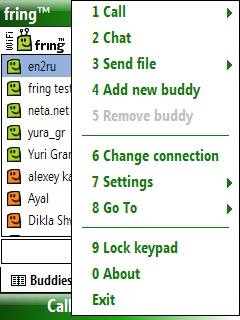
1. From the contact list choose Menu.
2. Choose the Add new buddy option.
Your address book will open. You can scroll and select any contact.
The contact’s phone number will be shown on the search screen and an option to ‘Add‘ or ‘Cancel‘ will appear. If the user is already a fring user, the contact will be added to your contact list. If the user has not yet registered with fring, an SMS will be sent to him, asking him/her to join fring.
3. If you click ‘Other‘ on the address book screen, you’ll be able to manually enter the phone number (including the int. prefix) and click add.
If the user is already a fring user, the contact will be added to your contact list. If the user has not yet registered with fring, an SMS will be sent to him, asking him/her to join fring.
Note: If you are using a ‘WiFi only’ device, you will not be able to use this feature.
During the next few days we will show you how to add friends, using other platforms. Stay tuned.