


News admin on 22 Nov 2007 03:49 pm
It’s all about ME, me, me with fringME! widget (preview)
Stay connected with your internet communities,
have them communicate with you directly from your favorite internet pages via fring.
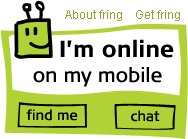
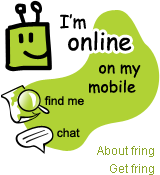
To start using fringME! you will need to have a Symbian 9.1 or 9.2 handset and the latest version of fring. Download now.
Whether you’re into internet communities, social networking, blogs, auction sites, you name it, life is simply about making online connections. So, we’ve been working hard to find new ways for fring users everywhere to stay connected with their online buddies, whether they’re fringsters or not. fring essentially enables your entire community to reach and find you on your fring-enabled mobile from anywhere on the web.One happy, intuitive example of this is our new fringME! widget, ……coming soon to a web page near you!
This WIDGET enables you to paste this cool new fringME! HTML code onto your own web pages, blogs and pretty much anywhere you have an internet presence of your own – enabling community members or casual visitors to instantly see whether you’re online, offline, or busy in call and also chat with you.
PLUS …(are you reading this sitting down?) view your location in real time via Google Maps (if you’re one of those lucky #@%$ with a GPS equipped handset).
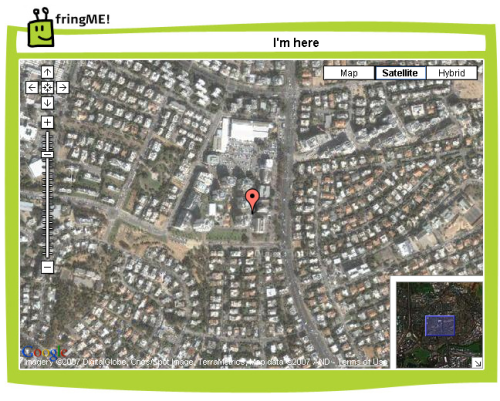
Important! (pay attention) Privacy settings inside fring on your handset requires you to switch on or switch off the fringME! location feature (you know, like ‘Opt in and out’… perfect for those occasions when you don’t want to be found!)The features included in the fringME! widget will be expanding, with more very cool stuff coming soon.To get your hands on your very own fringME! widget, simply visit the fringME! web page, enter your details, choose your preferred widget design and paste a small piece of html code into your pages. Then, switch on and configure fringME! on your mobile handset with fring installed, and away you go.
on 22 Nov 2007 at 7:40 pm 1.eugene said …
will it work on E65 with bluetooth gps?
[Reply]
on 22 Nov 2007 at 9:50 pm 2.Fring to launch new web widget at Pocket Picks said …
[...] (Via Fring) Share:These icons link to social bookmarking sites where readers can share and discover new web pages. [...]
on 22 Nov 2007 at 11:54 pm 3.ignazio said …
NICE IDEA!
It still does not work for me so I’ll let bug report.
[Reply]
on 23 Nov 2007 at 1:08 am 4.fring mobile voip australia » fringME! - text me with the new fring widget said …
[...] The fringME! widget has now been released. For more information please check out Alon’s fring blog post here. [...]
on 23 Nov 2007 at 12:57 pm 5.CallStyle | FringME Widgets Lets Your Contact Connect with You via the Web said …
[...] To boost its members’ online presence, Fring has introduced FringME widgets. If you are a FringME member, you can copy an HTML code from your FringME profile and paste it anywhere on the web. Through this widget, your contacts would know you whereabouts even if you are not online. And through this widget, your contacts, whether Fringster or not can connect with you through your mobile phone. [...]
on 23 Nov 2007 at 1:18 pm 6.vstefanyuk said …
does findme function work only for handsets with embedded GPS or for bluetooth based as well? If not, will be it supported in the next version?
In any case - very, very nice idea!!!
[Reply]
on 23 Nov 2007 at 6:26 pm 7.VoIP IP Telephony said …
Socializing with Fring, — fringME!
Mobile VoIP firm fring! has added fringME!, a widget for communicating and let your presence known in many ways. This widget could be embedded on blogs, social networking profiles, online auction sites and any other websites for that matter.
So, if yo…
on 24 Nov 2007 at 2:19 pm 8.Fring releases fringME! widget; Adds support for the Nokia E51 said …
[...] Folks behind Fring have announced a new fringME! widget, allowing users of the popular VoIP client with web sites, blogs or social networking profiles to interact (chat) with their visitors. But, it’s not all about chatting and sharing your presence with your community and/or your friends — in case you have a GPS equipped Symbian-based phone (N95, N95 8GB, N82), other people can also view your location in real time via Google Maps! Wow! [...]
on 24 Nov 2007 at 6:44 pm 9.luca said …
find me works with bluetooth gps? it would be super!!!!!!!!!!!!!
[Reply]
on 26 Nov 2007 at 3:12 am 10.Darla said …
Is it possible to chose a user name instead of having the number made available?
[Reply]
on 27 Nov 2007 at 3:06 pm 11.fring mobile voip australia » find me with fringME! - googleMaps meet fringME! said …
[...] Well, that’s not all. As you can read here there has been some great news from fring on the geotagging / geolocation front. [...]
on 28 Nov 2007 at 1:22 am 12.Danilo Táxi said …
Good
[Reply]
on 28 Nov 2007 at 10:38 am 13.Neta said …
“Is it possible to chose a user name instead of having the number made available?”
- This will be possible in the next version.
“find me works with bluetooth gps? it would be super!!!!!!!!!!!!!”
- Currently it doesn’t work with bluetooth GPS.
Neta, fring support.
[Reply]
on 28 Nov 2007 at 5:09 pm 14.luca said …
when gps BT will be enabled to work with find me service?
[Reply]
on 01 Dec 2007 at 12:15 pm 15.luca said …
any answer???
[Reply]
on 01 Dec 2007 at 7:47 pm 16.omri said …
@ Luca: We are working on it.
[Reply]
on 07 Dec 2007 at 3:13 am 17.suzi said …
hii..i want to know if we download fring to mobile. how much is the downloading size. pls let me know as soon as possible.
[Reply]
on 11 Dec 2007 at 6:11 pm 18.AT said …
Don’t be afraid!! Release iPhone native software! You know you have it!!
[Reply]
on 23 Feb 2008 at 5:34 pm 19.fring » Around the world freely in 160 days said …
[...] The guys even went so far as to test out some great new mobile technology. After a stop over in South Africa the guys implemented the newly launched fring widget onto their website. A Nokia N95 was sponsored by fring and away they went. Although life on the road was fast and furious and mobile internet connections somewhat slow and sometimes outright junk. The guys did not despair and made the regular effort to keep trying despite the sometimes poor experience, this early stage beta testing helped fring pave the way for revolutions in future technologies and for this the fring team would like to thank them. [...]
on 23 Feb 2008 at 5:35 pm 20.fring mobile voip south africa » Around the world freely in 160 days said …
[...] The guys even went so far as to test out some great new mobile technology. After a stop over in South Africa the guys implemented the newly launched fring widget onto their website. A Nokia N95 was sponsored by fring and away they went. Although life on the road was fast and furious and mobile internet connections somewhat slow and sometimes outright junk. The guys did not despair and made the regular effort to keep trying despite the sometimes poor experience, this early stage beta testing helped fring pave the way for revolutions in future technologies and for this the fring team would like to thank them. [...]
on 05 Sep 2009 at 1:07 pm 21.sherkhan said …
Hi i m not able to add widget in blogspot. Could u plz explain how to it stepwise.
[Reply]
on 30 Jan 2010 at 5:07 am 22.Cindy said …
Ahh, I remember the first blog I ever created. I wrote a story just like this. Smart minds must think alike!
[Reply]
on 12 May 2010 at 2:33 am 23.Cheap New York City said …
Really exceptional post, I liked reading through it. It had many outstanding information and facts. I will be bookmarking this site.
[Reply]
on 18 May 2010 at 12:05 pm 24.driver download windows 7 said …
Keep working ,splendid job!
[Reply]
on 05 Jun 2010 at 9:13 am 25.Dusan said …
On http://www.fringcall.com/fun/fringMe/ I can’t copy (and paste) the code because there is no code displayed at all (in the field of item 4).
Of course I’ve chosen/selected all necessary options in items 1-3.
What could be wrong?
[Reply]
on 14 Oct 2010 at 4:00 pm 26.Igre said …
so nice I liked it!
[Reply]
Asi serija Reply:
December 11th, 2011 at 2:14 pm
agree! it is so great!
[Reply]
on 27 Apr 2011 at 6:25 pm 27.Bowling sisters reverse roles at USBC Queens final said …
[...] fring » It’s all about ME, me, me with fringME! widget (preview) [...]